|
||||||||||||||
|
||||||||||||||
|
||||||||||||||
 |
 masterboot.s |
 |
||||||||||||
|
Skip to line: 1050 - 1100 - 1150 - 1200 - 1250 - 1281 | |
||||||||||||
|
|
|||||||||||||
|
If you have a comment for masterboot.s, please click here. | |
||||||||||||
|
||||||||||||||
|
|
|||||||||||||
|
|
|||||||||||||
|
|
||||||||||||||
|
||||||||||||||
|
||||||||||||||
|
masterboot.s |
|
||||||||||||
|
Skip to line: 1050 - 1100 - 1150 - 1200 - 1250 - 1281 | |
||||||||||||
|
|
|||||||||||||
|
If you have a comment for masterboot.s, please click here. | |
||||||||||||
|
||||||||||||||
|
|
|||||||||||||
|
|
|||||||||||||
|
1000
!
masterboot 1.9 - Master bootblock code
Author: Kees J. Bot
 1001
! modified
to support drives on 2nd IDE port -- asw 2000-01-23 1001
! modified
to support drives on 2nd IDE port -- asw 2000-01-23
| |
|
 1002
! 1002
!
|
|
|
|
|
|
An exclamation mark (!) indicates a comment. The assembler ignores
everything to the right of an exclamation point.
Before going any further, read the first 4 paragraphs in section 2.5.2 and read the entire 2.6.5 section of Operating Systems by Andrew Tanenbaum and Albert Woodhull. Haven't bought the book? You won't be able to get through this web site without buying the book - so buy the book. I won't be going over things that the book already discusses. | ||
|
|
1003
! This code may be placed in the first sector(the boot sector) of a floppy,
|
|
|
1004
! hard disk or hard disk primary partition. There it will perform the
|
|
|
1005
! following actions at boot time:
|
|
|
|
| |||
|
The code below checks to see if this code was loaded from a floppy; however, I don't understand why a master boot record would ever be put on a floppy. You typically do not partition a floppy. In the third paragraph of section 2.6.5, Tanenbaum and Woodhull discuss a circumstance in which a floppy might be partitioned but indicate that even under this circumstance, a master boot record would not exist on the floppy. Also, the comment on line 1151 suggests the same. If anyone can see a point to having a master boot record on a floppy, please submit a comment to the site which will be displayed below. | |
|||
|
|
| |||
|
 1006
! 1006
!
| |
|
1007
! - If the ALT key is held down, then '/dev/hd?'
is typed and you are
|
|
|
1008
! expected to type a number key (0 - 9) to select the device to boot
|
|
|
1009
! on primary IDE controller, or an
alpha key (a - j) to select a boot
|
|
|
1010
! device on the secondary controller
(a=hd10, b=hd11, ... f=hd15, etc).
|
|
|
|
|
|
hd0 is the entire first hard drive, hd1 is the first partition on that
hard drive, hd2 is the second, hd3 is the third and hd4 is the fourth.
hd5 is the entire second hard drive and hd6-hd9 are the partitions on that
drive. hd10 is the third hard drive and hd11-hd14 are the partitions
on that drive and hd15 is the fourth hard drive and hd16-hd19 are the partitions
on that drive. Within each partition there can be four further subpartitions.
hd1a is the first subpartition within hd1, hd1b is the second subpartition,
hd1c is the third and hd1d is the fourth.
If a drive is partitioned, there must be 4 partitions. If a partition is subpartitioned, there must be 4 subpartitions. Any partition or subpartition may have a size of 0 but there must be 4 partitions or subpartitions. Note that a partition can be specified after hitting the ALT key but a subpartition cannot be specified. For example, if subpartitions hd3b and hd3c are both bootable, there's no way of specifying either one after hitting the ALT key. (You could use the installboot utility program to mark one of the subpartitions as active but that takes a little more effort.) | ||
|
|
1011 ! | |
|
1012 ! - If locked into booting a certain partition,
then do so.
|
|
|
|
|
| See line 1053 for an explanation of this comment. | ||
|
|
1013 !
1014 ! - If the booted device is a hard disk and one of the partitions is active 1015 ! then the active partition is booted. 1016 ! 1017 ! - Otherwise the next floppy or hard disk device is booted, trying them one 1018 ! by one. 1019 ! 1020 ! To make things a little clearer, the boot path might be: | |
|
1021 ! /dev/fd0
- Floppy disk containing data, tries fd1 then hd0
|
|
|
|
|
| Older machines are likely to halt the process until you remove the floppy. | ||
|
|
1022 ! [/dev/fd1]
- Drive empty
1023 ! /dev/hd0 - Master boot block, selects active partition 3 1024 ! /dev/hd3 - Submaster, selects active subpartition 1 | |
|
1025 ! /dev/hd3a
- Minix bootblock, reads secondary boot code /boot
|
|
|
|
|
| The code found in the bootblock.s file is called the bootstrap. | ||
|
|
1026
! Minix
- Started by secondary boot from /minix
|
|
|
|
|
| If a hard drive partition (as the book describes in section 2.6.5) is booted, the sequence is master boot (this code), bootstrap, boot monitor and finally the minix operating system. If a hard drive subpartition is booted, the sequence is master boot, master boot (again), bootstrap, boot monitor and finally the minix operating system. | ||
|
|
|
|
|
The "0x" indicates that the value is in hexadecimal notation.
If you are unfamiliar with the term "hexadecimal," look at this site.
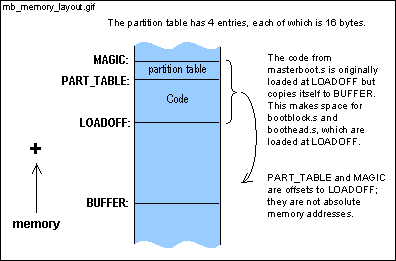
The first instruction of this code (the jmp instruction on line 1052) is loaded at an offset of 0x7C00 into memory. The figure below shows the memory layout. This code is initially loaded at memory address LOADOFF (0x7C00) but then copied to memory address BUFFER (0x0600). The code jmp 's there to make room for the next block we'll load, which will either be another master boot block or a bootstrap (as found in bootblock.s).
Although you won't find it explicitly in this code or in bootblock.s, both the master boot blocks and boot blocks on disk have the magic number at an offset of 510. How'd they get there? The installboot utility is responsible for patching in the values. Go to this link for the master boot and this link for the boot block. These links show where SIGNATURE (0xAA55, the magic number) is patched into the master boot blocks and boot blocks at MAGIC (which is the same value as installboot's SIGPOS). Don't spend too much time studying the installboot.c code. It is only important that you begin to understand the role that the installboot utility plays. | ||
|
|
1034
!
<ibm/partition.h>:
|
|
|
1035
bootind =
0
|
|
|
1036
sysind =
4
|
|
|
1037
lowsec = 8
|
|
|
|
|
| ||
|
|
1038
1039 | |
|
1040
.define begtext, begdata, begbss, endtext, enddata,
endbss, _main
| |
|
1041
.data
|
|
|
1042
begdata:
|
|
|
1043
.bss
|
|
|
1044
begbss:
|
|
|
1045
.text
|
|
|
1046
begtext:
|
|
|
1047
_main:
|
|
|
|
| |||
|
There are 3 main assembler files in the boot sequence (masterboot.s,
bootblock.s, and boothead.s
) and only 2 of the files .define begtext, begdata,
and begbss and only masterboot.s (this file).defines
endtext, enddata,
endbss, and _main.
The convention used in bootblock.s
is the simplest - bootblock.s begins text (i.e. code) sections with .text,
data sections with .data, and (if it had a bss section) bss sections with .bss
but does not .define begtext,begdata, begbss,
endtext, enddata, endbss, and _main.
If anyone sees a point to the extra .defines (begtext, begdata, etc.), please submit a comment to the site which will be displayed below. (The bss section holds uninitialized global variables; the bss section is discussed later.) |
|
|||
|
|
| |||
|
1048
1049 ! Find active (sub)partition, load its first sector, run it. 1050 1051 master: 1052 jmp over | |
|
1053
fix: .data1 0
! If 1-9 then always boot that device
|
|
|
|
|
|
.data1 reserves 1 byte of memory at the given address (in this
case, fix). This memory address is initialized to a value
of zero (0). If this value is anything other than 0, we are "locked"
into booting the specific partition. (See line 1012 above).
How do we change the value of fix? Again, this is a responsibility
of the installboot utility.
Why does data immediately follow the first instruction? Directly after the first instruction is a convenient place to stick the data. You'll see this trick elsewhere also. Look at line 06051 in the book. This is the first instruction of the minix kernel. | ||
|
 |
1054 over: | |
|
1055
xor ax, ax
|
|
|
1056
mov ds, ax
|
|
|
1057
mov es, ax
|
|
|
|
|
|
The first instruction zeroes the ax register (any number xor'ed with
itself is zero). This is a pretty common practice. The instruction
mov ax, #0 is slower and takes up 3 bytes compared with xor's 2 bytes. One thing that initially confuses people with assembler is the order of the operands. The syntax of the mov instruction is: mov destination, source This seems a little strange to me (probably because this is not consistent with the syntax of the Unix cp command) but most assemblers use this syntax. | ||
|
|
1058
cli
|
|
|
1059
mov ss, ax
! ds = es = ss = Vector segment
|
|
|
1061
sti
|
|
|
|
|
|
If you mov a value into the stack register (ss)
or the stack pointer (sp), disable the interrupts first.
The ss and sp registers hold the address to which the
interrupt will return after its completion. If the ss and
sp
register are in flux, you have no idea where the code will return.
The interrupts are disabled with the cli (clear interrupts) instruction and reenabled with the sti (set interrupts) instruction. What's the pound sign (#) all about? The pound sign indicates that the value of LOADOFF rather than the contents of the memory location LOADOFF is mov'ed into the register. | ||
|
|
1062
mov bp, #BUFFER+PART_TABLE
! Often used address
|
|
|
|
|
| bp is used here as a general purpose register. The value of bp doesn't change in this code. | ||
|
|
1063 | |
|
1064
! Copy this code to safety, then jump to it.
|
|
|
|
|
| The figure in the comments of line 1027 describes copying this code from LOADOFF to BUFFER and then jmp'ing there. This is accomplished in lines 1065-1073. | ||
|
|
1065 mov si, sp ! si = start of this code | |
|
1066
push si
! Also its return address
|
|
|
|
|
| This line is important later in the code. The ret instruction on lines 1161, 1183, and 1243 jumps to LOADOFF, which is where either another master boot block or a boot block will have been loaded. | ||
|
|
1067 mov di, #BUFFER ! Buffer area | |
|
1068
mov cx, #512/2
! One sector
|
|
|
|
|
| Since the rep movs instruction moves cx words (not bytes) from ds:si (which is 0:LOADOFF) to es:di (which is 0:BUFFER), the number of bytes is divided by 2. (The size of a word is architecture dependent. On a 16-bit architecture - like real-mode on the 80x86's - 2 bytes=1 word and on a 32-bit architecture - like protected mode on the 80x86's - 4 bytes=1 word. Since the processor is in real mode during the boot sequence and switches to protected mode (if the minix kernel has been compiled for protected mode) immediately before jumping to the kernel, 2 bytes=1 word. Note that word is sometimes used to mean 2 bytes, regardless of the architecture. ) | ||
|
|
1069
cld
|
|
|
|
|
| cld (clear direction flag) specifies that the rep movs instruction copies the bytes from 0:LOADOFF to 0:LOADOFF+512, not the bytes from 0:LOADOFF to 0:LOADOFF-512. If the latter is desired, use std (set direction flag) instead of cld. | ||
|
|
1070
rep
1071 movs | |
|
|
|
| jmpf (far jump) obtains a new segment (in this case 0) and a new offset (BUFFER+migrate). Even though movb ah, #0x02 is the next instruction executed, this instruction is located LOADOFF-BUFFER bytes lower in memory. | ||
|
|
1073 migrate:
1074 | |
|
1075
! ALT key pressed to override active device boot?
|
|
|
1076
key:
|
|
|
1077
movb ah, #0x02
! Keyboard shift status
|
|
|
1078
int 0x16
|
|
|
1079
testb al, #0x08
! Bit 3 = ALT key
|
|
|
1080
jz noalt
! No ALT key pressed
|
|
|
|
|
|
int 0x16 is the keyboard BIOS function call. If ah=2,
int
0x16 tests the status of the control, shift and ALT keys. If
the third bit from the right (0x08 = 00000100) in the return value (al)
is high, the ALT key has been pressed.
The "b" in movb and testb indicates that the instructions operate on bytes rather than words. The difference between the test and the and instruction is that the test instruction doesn't change the destination operand (in this case al). It only affects the flag register. In this case we're concerned with the Z (zero) flag. If al's third bit from the right isn't 1 (the alt key wasn't pressed), the testb instruction will set the Z flag and the jump is made in the next instruction. noalt is on line 1098. | ||
|
|
|
|
|
.data2 reserves 2 bytes for data. Study print
(line 1256) to see how this data is used. Also look at memory location
choice
on line 1272
BUFFER+devhd is the string's beginning offset address in memory. | ||
|
|
1083
getkey: xorb ah, ah
! Wait for keypress
|
|
|
1084
int 0x16
|
|
|
1086
subb al, #0x30
! al -= '0'
|
|
|
1087
cmpb al, #10
|
|
|
1088
jl keyok
! key in 0 - 9 range
|
|
|
1089
andb al,#0x1f
! ignore alpha case
|
|
|
1090
subb al,#7
! correction for alpha keys
|
|
|
1091
cmpb al,#20
|
|
|
1092
jae getkey
! Key not in 0 - 19 range
|
|
|
|
|
|
At this point, the user has hit the ALT key and the code is waiting
for the user to specify a partition (0-9, a-j). When the user types
in a value, the ascii value of the pressed key is placed in choice
(line 1272), overwriting the initial '0'. This ascii value is then
converted to its corresponding integer value. The ascii values for
'0' through '9' are converted to the integers 0 through 9 and the ascii
values for 'a' or 'A' through 'j' or 'J' are converted to the integers
10 through 19. For a little help, here's an ascii
chart.
cmp is a subtraction that only affects the flag register. In this way, cmp is similar to test. The following jae jumps if the first operand in cmp is above or equal to the second operand. | ||
|
|
1093
keyok: push ax
|
|
|
|
|
| Since print uses ax, ax is pushed onto the stack; if ax isn't pushed (and then later popped (line 1096)), its value will be lost. This is commonly done. For example, it's also done on line 1109. | ||
|
|
1098
noalt:
|
|
|
|
|
|
The ALT key wasn't pressed. If fix is 0, a jump to findactive
is made and the partition tables on the hard drives are searched for a
non-zero bootind field.
A partition table entry with the non-zero bootind field indicates a bootable partition. | ||
|
|
1099
movb al, BUFFER+fix
! Always boot a certain partition?
1100 testb al, al 1101 jz findactive ! No, boot the active partition | |
|
1102
override:
|
|
|
|
|
| A value between 0 and 19 is in al; this is the partition that will be booted. Another master boot block from another device must be loaded if the partition isn't on the current device (remember that the current device is in dl). | ||
|
|
1103
cbw
! ax = partition choice
1104 movb dl, #5 | |
|
1105
divb dl
! al = disk, ah = partition within disk
|
|
|
|
|
| For divb, ax is divided by dl (in this case) and the quotient is placed in al and the remainder in ah. al will have the value of the hard drive (0-3) and ah will have the value of the partition (0-4). | ||
|
|
1106 movb dl, #0x80 | |
|
1107
addb dl, al
! dl = disk
|
|
|
|
|
| The BIOS uses the values 0x80, 0x81, 0x82, and 0x83 to indicate the 1st, 2nd, 3rd, and 4th hard drives. | ||
|
|
1108 movb al, ah ! al = partition within disk | |
|
1109
push ax
! Save partition choice
|
|
|
|
|
| The ax register is used by load0; since ax is needed on line 1113, its value is pushed and then popped (see line 1112). | ||
|
|
|
|
|
load0 loads the first sector of the hard drive specified
by dl. Keep in mind that this master boot record may be
the same as the master boot record that is currently executing. We
could have checked for this and saved the time it takes to load the master
boot record but it would have added complexity to the code.
If the partition is 0, 5, 10, or 15, then the master boot record of the appropriate hard drive is loaded and executed (line 1114). If the partition is not 0, 5, 10, or 15, the partition table from the master boot record that has just been loaded is sorted (line 1121) and the first sector from the desired partition is loaded (line 1146). This sector either has another master boot record (in which case there are subpartitions on the partition that was chosen) or a bootstrap that will load the boot monitor from that partition. | ||
|
|
1111
jb error0
! Unable to read it
1112 pop ax ! Restore partition choice 1113 subb al, #1 ! Was it 0 mod 5? 1114 jl bootstrap ! Jump to the master bootstrap | |
|
1115
mov si, #LOADOFF+PART_TABLE
! si = new partition table
|
|
|
|
|
| On lines 1115-1119, the partition table from the master boot record that is currently executing is overwritten by the partition table from the master boot record that was just loaded (line 1110). | ||
|
|
1116 mov di, bp ! To buffer area | |
|
1117
mov cx, #4*PENTRYSIZE/2
|
|
|
|
|
| The number of bytes that are transferred is divided by 2 since movs moves words, not bytes. | ||
|
|
1118 rep | |
|
1119
movs
|
|
|
|
|
| movs moves a word from ds:si to es:di. Since this instruction is prefixed by rep, it is executed cx times; si and di will increment each word. | ||
|
|
1120 addb cl, #4 ! Four times is enough to sort | |
|
1121
sort: mov
si, bp
! First table entry
|
|
|
|
|
|
Lines 1121-1146 sort a partition table and then load the first sector
of the desired partition.
Here's the structure of the partition table again:
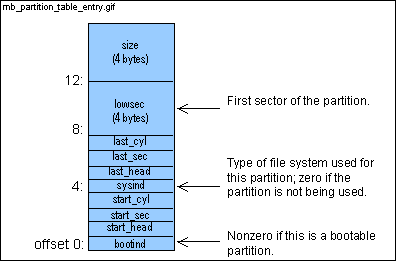
Suppose a hard drive has a partition table with (lowsec, sysind) pairs (1,1), (1000,1), (200,0), and (350,1). (Remember that a sysind value of 0 indicates that the partition is unused.) This is the order of the partition table entries in the master boot record on the hard drive. After the partition entries are sorted in memory, the order is (1,1), (350,1), (1000,1), and (200,0). All partitions in use are sorted by their lowsec values and all unused partitions are at the end. If the second partition is specified (by hitting the ALT key), the partition with a lowsec of 350, the partition with the second lowest lowsec value currently in use, is booted. Keep in mind that the partition table entries are sorted in memory but the partition table on the hard drive is not affected. | ||
|
|
1122
bubble: lea di, PENTRYSIZE(si)
! Next entry
|
|
|
|
|
|
The lea instruction loads the register specified by the first
operand with the offset address of the data specified by the second operand.
This is the first time that we've seen the OFFSET(register) notation. It's also the first time that the lea instruction has been used. OFFSET(register) is the value register + OFFSET. In this case, register is si and OFFSET is PENTRYSIZE. The lea (load effective address) instruction loads this value into di. (mov di, PENTRYSIZE(si) would move the contents of memory address PENTRYSIZE+si into di.) | ||
|
|
|
|
| Just to make sure you get the hang of it, we'll look again at the OFFSET(register) notation. In this case, register is si and OFFSET is sysind (it doesn't matter that sysind is not capitalized; what matters is that sysind is a constant - sysind is set on line 1036). The byte (cmpb compares bytes; cmp compares words) at memory location sysind+si is compared with the contents of ch. | ||
|
|
1124 jz exchg ! Unused entries sort to the end | |
|
|
|
| Computing di->lowsec - si->lowsec is complicated by the fact that lowsec is 4 bytes and the subtract instructions (sub and sbb) operate on 2 byte operands. | ||
|
|
|
|
|
sbb subtracts the second operand (lowsec+2(si)) from
the first (bx) and then subtracts an additional 1 if the carry
flag was set by sub on line 1126. It then places the result
in the first operand (bx).
Notice that the result from sbb overwrites the result from sub (they both place their results in bx). We don't care since we are only concerned whether the result is negative or positive. If the result is negative, the carry flag will be set and the jnb instruction will jump to order. | ||
|
|
1129 jnb order ! In order if si->lowsec <= di->lowsec | |
|
1130
exchg: movb ah, (si)
|
|
|
|
|
| If the code arrives here, the partition entries (each entry is 16 bytes) of 2 adjacent entries are exchanged. | ||
|
|
1131
xchgb ah, PENTRYSIZE(si)
! Exchange entries byte by byte
1132 movb (si), ah 1133 inc si 1134 cmp si, di 1135 jb exchg 1136 order: mov si, di 1137 cmp si, #BUFFER+PART_TABLE+3*PENTRYSIZE 1138 jb bubble 1139 loop sort | |
|
1140
mov si, bp
! si = sorted table
|
|
|
|
|
| At this point, the partition table is sorted. The partition that has been chosen must have a nonzero sysind value (in other words, it must be in use - see line 1144). | ||
|
|
1141
movb ah, #PENTRYSIZE
1142 mulb ah ! ax = al * PENTRYSIZE 1143 add si, ax ! si = address of partition entry 1144 cmpb sysind(si), #1 ! Should be in use 1145 jb error0 1146 jmp loadpart ! Get the partition bootstrap 1147 1148 ! Find the active partition | |
|
1149
findactive:
|
|
|
|
|
|
A jump from line 1102 was made for the code to arrive here. The
value at address
fix (see line 1053) is still 0 and has not been
changed with the installboot utility program. The boot sequence has
also not been interrupted by holding down the ALT key.
The partition entries are searched for the active partition. The active partition is the partition that is booted by default. The 7th bit (0-indexed) in the bootind entry is set for the active partition (see line 1155).
| ||
|
|
1150
testb dl, dl
|
|
|
1151
jge nextdisk
! No partitions on floppies
|
|
|
|
|
|
As I said in the beginning, I'm not sure why we need to check whether
this code came from a floppy. Floppies can't be partitioned and therefore
can't have a master boot record. However, it certainly doesn't hurt
anything to check.
testb sets the sign flag if the value in dl is negative. When is the value negative? In two's complement notation, if the rightmost bit is a 1 then the value is negative. So for a one byte value, anything greater than 0x80 is negative. Remember that 0x00 and 0x01 correspond to the first and second floppy drives and 0x80, 0x81, 0x82, and 0x83 correspond to hard drives 1-4. The jge instruction jumps to nextdisk if the value in dl is positive. In other words, the floppy drives are skipped. | ||
|
|
1152
mov si, bp
|
|
|
|
|
| bp points to the partition table. | ||
|
|
|
|
| If the value of the sysind entry is 0, the partition is not being used and cannot be active. | ||
|
|
1154
jz nextpart
1155 testb bootind(si), #0x80 ! Active partition flag in bit 7 1156 jz nextpart ! It's not active | |
|
1157
loadpart:
|
|
|
|
|
| At this point, dl has the hard drive and si has the address of the partition table entry of the partition that will be booted. | ||
|
|
1158 call load ! Load partition bootstrap | |
|
1159
error0: jb error1
! Not supposed to fail
|
|
|
|
|
| I'm not sure why we don't jump directly to error if there's an error instead of first jumping to error1. | ||
|
|
1160
bootstrap:
|
|
|
|
|
| The ret instruction removes 2 bytes from the stack and places them into the ip (instruction pointer) register. What 2 bytes are these? On line 1066 the value LOADOFF was pushed onto the stack. This is the address of the code that was just loaded. Remember that master boot, the bootstrap and the boot monitor are all originally loaded at LOADOFF (0x7C00) and then migrate to BUFFER (0x0600). | ||
|
|
1161
ret
! Jump to the master bootstrap
1162 nextpart: 1163 add si, #PENTRYSIZE | |
|
1164
cmp si, #BUFFER+PART_TABLE+4*PENTRYSIZE
|
|
|
|
|
| If si points to the 5th partition, the search for an active partition in the partition table is done since a hard drive can only have 4 partitions. The partition table on the next hard drive must be searched. | ||
|
|
1165
jb find
1166 ! No active partition, tell 'em | |
|
|
|
| If there isn't an active partition on the device specified by dl , then a message is printed and the partition table on the next hard drive is searched. | ||
|
|
1168
.data2 BUFFER+noactive
1169 1170 ! There are no active partitions on this drive, try the next drive. | |
|
1171
nextdisk:
|
|
|
|
|
| Most of the complexity of the next few lines (1172-1186) is for floppies. Again, I don't understand why we need to worry about floppies in the master boot code. | ||
|
|
1172 incb dl ! Increment dl for the next drive | |
|
1173
testb dl, dl
|
|
|
1174
jl nexthd
! Hard disk if negative
|
|
|
|
|
| To determine if dl specifies a hard drive, the same test used on lines 1150-1151 is used. | ||
|
|
1175
int 0x11
! Get equipment configuration
|
|
|
|
|
| int 0x11 returns a lot of information but the only important information (in this case) is found in bits 6-7. Bits 6-7 hold the number of floppy drives on the system. | ||
|
|
1176
shl ax, #1
! Highest floppy drive # in bits 6-7
1177 shl ax, #1 ! Now in bits 0-1 of ah 1178 andb ah, #0x03 ! Extract bits 1179 cmpb dl, ah ! Must be dl <= ah for drive to exist | |
|
1180
ja nextdisk
! Otherwise try hd0 eventually
|
|
|
|
|
| After all the floppies (0x00 and possibly 0x01) on the system have been searched, the code increments ah and jumps to nextdisk until ah equals 0x80. This is not extremely efficient but it doesn't matter since (once again, I contend) lines 1175-1183 are never executed since floppies have no relevance in the master boot code. | ||
|
|
1181
call load0
! Read the next floppy bootstrap
1182 jb nextdisk ! It failed, next disk please 1183 ret ! Jump to the next master bootstrap 1184 nexthd: call load0 ! Read the hard disk bootstrap 1185 error1: jb error ! No disk? | |
|
1186
ret
|
|
|
|
|
| As described on line 1160, this jumps to the code that has just been loaded. | ||
|
|
1187
1188 1189 ! Load sector 0 from the current device. It's either a floppy bootstrap or | |
|
1190
! a hard disk master bootstrap.
|
|
|
|
|
|
If sector 0 must be loaded from the current device (remember, the value
of the current device is in dl) , a jump to load0 is made.
For all other sectors, a jump to load is made.
There's a little bit of a trick here. Since load loads the first sector for the drive specified by dl and the partition pointed to by si , the lowsec value of the entry that si currently points to is overwritten with a 0. Is that a problem? No, since in this code the partition table is never written back to disk. | ||
|
|
|
|
| lowsec , set on line 1037, is the offset within a partition table entry to the lowsec field. The lowsec field is the lowest sector of a partition. | ||
|
|
1195
!jmp load
1196 1197 ! Load sector lowsec(si) from the current device. The obvious head, sector, 1198 ! and cylinder numbers are ignored in favour of the more trustworthy absolute 1199 ! start of partition. | |
|
1200
load:
|
|
|
|
|
lowsec(si) is the absolute sector number that will be loaded.
Unfortunately, the absolute sector number must be converted to a cylinder
number, head number and sector number.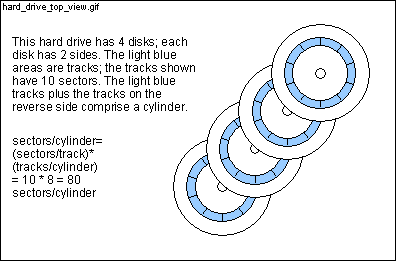
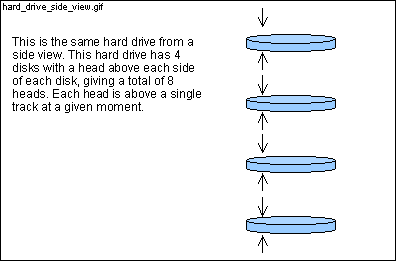
The first call to int 0x13 (line 1206) queries the hard drive for its maximum sector number and the maximum head number. With these values, the sectors per cylinder can be determined and the absolute sector number can be converted to a cylinder number, head number and a sector number. Once these values are known, the desired sector can be loaded with the second int 0x13 call (line 1230). | ||
|
|
1201
mov di, #3
! Three retries for floppy spinup
|
|
|
|
| |||
|
Somebody please tell me how we can load a sector from a floppy in this scenario because I don't believe it can happen. Line 1106 ensures that any overriding value (whether typed in or gotten from memory location fix ) will be a hard drive. Also, if this code is from a hard drive (which, according to the book, it must be) and there is no overriding value then we will either load a sector from the same hard drive or the next hard drive. If you think I am wrong, please submit a comment to the site which will be displayed below. | |
|||
|
|
| |||
|
1202 retry: push dx
! Save drive code
1203 push es 1204 push di ! Next call destroys es and di 1205 movb ah, #0x08 ! Code for drive parameters | |
|
1206
int 0x13
|
|
|
|
|
|
int 0x13 , ah =0x08 returns the device geometry of the
drive specified by dl . dl is 0x80 for the first
drive, 0x81 for the second, 0x82 for the third and 0x83 for the fourth.
The call returns the maximum sector number in bits 0-6 of cl and
the maximum head number in dh . Adding to the confusion,
the value that int 0x13 returns for the maximum head number has
a 0-origin. This means that if int 0x13 returns a 15 for
the maximum head number, there are actually 16 heads.
Let's work through an example. Assume that we want to load the 5232nd sector of a hard drive with 2000 cylinders, 16 heads, and 25 sectors/track. 512 bytes/sector * 25 sectors/track * 16 tracks/cylinder * 2000 cylinders = 400MB hard drive. The int 0x13 , ah =0x08 call returns 25 in cl and 15 in dh for this hard drive. 1 is added to dh at line 1210 to move to a 1-origin. | ||
|
|
1207
pop di
1208 pop es 1209 andb cl, #0x3F ! cl = max sector number (1-origin) 1210 incb dh ! dh = 1 + max head number (0-origin) 1211 movb al, cl ! al = cl = sectors per track | |
|
1212
mulb dh
! dh = heads, ax = heads * sectors
|
|
|
|
|
| Continuing with our example, al is multiplied (note that mul multiplies ax ; mulb multiplies al ) by dh . The result is placed in ax and then moved to bx (line 1213). So bx = 25 * 16 = 400 (sectors/cylinder). | ||
|
|
1213
mov bx, ax
! bx = sectors per cylinder = heads * sectors
1214 mov ax, lowsec+0(si) 1215 mov dx, lowsec+2(si)! dx:ax = sector within drive | |
|
1216
div bx
! ax = cylinder, dx = sector within cylinder
|
|
|
|
|
|
The absolute sector number (which is stored in dx-ax and for
our example is 5232) is now divided by bx (which is 400 in our
example). The div instruction divides dx-ax by
the operand (in our example
bx ) and puts the quotient in ax
and the remainder in
dx . So ax =13 and dx =32.
So we know we have the 13th cylinder and the 32 sector within that cylinder.
However, our work is not done. We still have to break up the 32 into
a track number and a sector number. So 32 is divided by cl ,
the sectors/track, on line 1219. divb divides ax
by the operand (in this case cl ) and puts the quotient into al
and the remainder into ah. So al =1 and ah =7.
The value in ah is a 0-origin value; on line 1225, 1 is added
to this value to get a 1-origin value.
At this point, the absolute sector number 5232 has been broken up into a cylinder number (dx =13), a track number (al =1) and a sector number (ah =7, 0-origin). Lines 1218 through 1229 move and shift the bits around to the positions that int 0x13 , ah =0x02 (line 1230) expects. I'll leave it to you to finish the example. | ||
|
|
1217
xchg ax, dx
! ax = sector within cylinder, dx = cylinder
1218 movb ch, dl ! ch = low 8 bits of cylinder 1219 divb cl ! al = head, ah = sector (0-origin) 1220 xorb dl, dl ! About to shift bits 8-9 of cylinder into dl 1221 shr dx, #1 1222 shr dx, #1 ! dl[6..7] = high cylinder 1223 orb dl, ah ! dl[0..5] = sector (0-origin) 1224 movb cl, dl ! cl[0..5] = sector, cl[6..7] = high cyl 1225 incb cl ! cl[0..5] = sector (1-origin) 1226 pop dx ! Restore drive code in dl 1227 movb dh, al ! dh = al = head 1228 mov bx, #LOADOFF ! es:bx = where sector is loaded 1229 mov ax, #0x0201 ! Code for read, just one sector | |
|
1230
int 0x13
! Call the BIOS for a read
|
|
|
|
|
| int 0x13 , ah =0x02 copies sectors from a hard drive or floppy (specified by dl ) to memory. al specifies how many sectors to copy, bits 0-5 of cl specify the sector number, dh specifies the head number and ch specifies the low 8 bits of the cylinder number and bits 6-7 of cl specify the high bits of the cylinder number. es:bx specifies where in memory we want to load the sectors. If the int 0x13 , ah =0x02 call fails, the carry (C) flag will be set. If the carry flag is set, the jnb instruction will not jump to memory location ok. | ||
|
|
1231
jnb ok
! Read succeeded
1232 cmpb ah, #0x80 ! Disk timed out? (Floppy drive empty) 1233 je bad 1234 dec di 1235 jl bad ! Retry count expired 1236 xorb ah, ah | |
|
1237
int 0x13
! Reset
|
|
|
|
|
| int 0x13 , ah =0x00 resets the hard drive. Another attempt to read the drive is made unless 3 attempts have already been made. | ||
|
|
1238 jnb retry ! Try again | |
|
1239
bad: stc
! Set carry flag
|
|
|
|
|
| It's common practice for a function (like load ) to set the carry flag if something goes wrong. The code that called the function should check the carry flag after the function returns (see lines 1159 and 1185). | ||
|
|
1240 ret | |
|
|
|
| Since LOADOFF+MAGIC doesn't have a pound (#) sign in front of it, the value at memory address LOADOFF+MAGIC is compared rather than the value of LOADOFF+MAGIC . The value at memory address LOADOFF+MAGIC is 'AA55' if the code that was just loaded is a master boot block or a bootblock. | ||
|
|
1242
jne nosig
! Error if signature wrong
1243 ret ! Return with carry still clear 1244 nosig: call print 1245 .data2 BUFFER+noboot 1246 jmp hang 1247 1248 ! A read error occurred, complain and hang | |
|
1249
error:
|
|
|
|
|
| If the code arrives here, neither a master boot block nor a bootstrap was found. Note that after calling print , the code falls through to hang. | ||
|
|
1250
call print
1251 .data2 BUFFER+readerr 1252 1253 ! Hang forever waiting for CTRL-ALT-DEL 1254 hang: jmp hang 1255 | |
|
1256
print: pop
si
! return address
|
|
|
|
|
| Look at line 1081. A return from print cannot return to line 1082 since this contains non-executable data. A return to line 1083 is necessary since this line contains an executable instruction. Line 1258 replaces the former return address on the stack with the correct return address. | ||
|
|
1257
lods
! ax = *si++ = word after 'call print'
|
|
|
|
|
|
lods loads whatever si points to into ax
and increments si by 2. lodsb increments si
by 1.
The next few lines are tricky. At this point, ax holds the value at the memory address that si initially pointed to (before the increment). si initially pointed to the address after the print instruction. Look at line 1081-1082 again. The value at the address after the print instruction is another address, BUFFER+devhd . So ax holds the value BUFFER+devhd. On line 1259, this value is loaded into si so that the following lodsb instruction loads the first character of the devhd (line 1271) string. | ||
|
|
1258
push si
! new return address
1259 mov si, ax 1260 prnext: lodsb ! al = *si++ is char to be printed | |
|
1261
testb al, al
|
|
|
1262
jz prdone
! Null marks end
|
|
|
|
|
| As soon as the null character ('\0' ) is reached, print is done. Be aware that there are a couple of tricks on lines 1271-1272. | ||
|
|
1263
movb ah, #14
! 14 = print char
1264 mov bx, #0x0001 ! Page 0, foreground color | |
|
1265
int 0x10
! Call BIOS VIDEO_IO
|
|
|
|
|
| int 0x10 , ah =14 prints the character in al to the current cursor position and advances the cursor. bh holds the active page and bl holds the foreground color. | ||
|
|
1271
devhd:
.ascii "/dev/hd?\b"
|
|
|
1272
choice:
.ascii "\0\r\n\0"
|
|
|
|
|
|
The compiler translates .ascii strings to their ascii equivalent.
The next two lines are equivalent:
.ascii "go"
(The ascii representation of 'g' is 0x67 and the ascii representation of 'o' is 0x6F.) Since devhd doesn't have a terminating '\0 ', how does print (line 1256) know when to stop? The answer is that it stops when it runs into the first '\0 ' from choice . Note that the strings are in consecutive memory addresses. The last character of the devhd string and the first character of the choice string are consecutive memory addresses. Won't print return immediately after the first character when printing choice ? The answer is no. The value of the first character is modified (line 1085) before calling print (line 1094). "\r\n " is a return. '\r ' moves the cursor to the leftmost position and '\n ' advances the cursor to the next line. '\b ' is the bell. | ||
|
|
1273 noactive: .ascii
"None active\r\n\0"
1274 readerr: .ascii "Read error \0" 1275 noboot: .ascii "Not bootable \0" 1276 .text 1277 endtext: 1278 .data 1279 enddata: 1280 .bss 1281 endbss: | |
 |
end of fileback up |
 |