|
||||||||||||||
|
||||||||||||||
|
||||||||||||||
 |
 bootimage.c |
 |
||||||||||||
|
Skip to line: 7050 - 7100 - 7150 - 7200 - 7250 - 7300 - 7350 - 7400 - 7450 - 7500 - 7550 - 7600 - 7650 | |
||||||||||||
|
|
|||||||||||||
|
If you have a comment for bootimage.c, please click here. | |
||||||||||||
|
||||||||||||||
|
|
|||||||||||||
|
|
|||||||||||||
|
|
||||||||||||||
|
||||||||||||||
|
||||||||||||||
|
bootimage.c |
|
||||||||||||
|
Skip to line: 7050 - 7100 - 7150 - 7200 - 7250 - 7300 - 7350 - 7400 - 7450 - 7500 - 7550 - 7600 - 7650 | |
||||||||||||
|
|
|||||||||||||
|
If you have a comment for bootimage.c, please click here. | |
||||||||||||
|
||||||||||||||
|
|
|||||||||||||
|
|
|||||||||||||
| 
| |
| 7000
/* bootimage.c - Load an image and start it. Author: Kees J. Bot
| |
| 7001
* 19 Jan 1992
| |
| 7002
*/
| |
| | |
|
bootminix() (line 7647) is invoked by the boot monitor boot
command and (if options are passed to
the kernel) by the boot monitor boot -optsvar
command. bootminix() is the high-level function
that:
1) calls select_image() (line 7589) to find the desired OS image file on disk. 2) calls exec_image() (line 7348); exec_image() loads the OS image and calls minix(), which switches the system to protected mode (if the kernel was compiled for protected mode) and then jumps to the kernel. bootminix() returns when the OS returns to the boot monitor (for example, when the user issues the shutdown command). | ||
|
| 7003
#define BIOS 1 /* Can only be used under the BIOS.*/
| |
| | |
|
#define is a preprocessor command. The preprocessor replaces
all occurrences of the first string (in this case, "BIOS") with
the second string (in this case, "1") before compilation.
The string "BIOS" actually never occurs in this file after this #define. It is important to note, however, that bootimage.c is used to create boot, the boot monitor, but is not used to create the edparams utility program. | ||
|
| 7004
#define nil 0
| |
| | |
| The string "nil" is used to increase readability. | ||
|
| 7006 | |
| 7005 #define _POSIX_SOURCE 1 | |
| 7006
#define _MINIX \1
| |
| | |
|
_POSIX_SOURCE and _MINIX are macros that are used by library routines. In fact, nearly all macros that begin with an
underscore (_) are specific to library routines.
The POSIX standard was created to improve portability between UNIX systems. The 12th paragraph of section 2.6.2, lines 01184-011200, and lines 01241-01245 in Operating Systems describe the _POSIX_SOURCE and _MINIX macros. | ||
|
| 7007
#include <stddef.h>
| |
| | |
|
A function must be either defined or declared in a file before it can
be used. Header files (files ending in .h) make the task of declaring
variables easier.
Before compilation begins, the preprocessor replaces any #include <filename.h> statement with the contents of filename.h. If the filename is enclosed in < and >, the preprocessor searches for the file in the default directory (typically /usr/include) and other directories specified by the -I option of the compiler (see line 7018). If the filename is quoted (see line 7021), the preprocessor looks for the include file in the same directory that the source file is found. (In this case, bootimage.c is the source file and is found in the /usr/src/boot directory.) As an example, strlen() (see line 7622) is declared in the file string.h (see line 7012). string.h is located in the directory /usr/include. Header files, in addition to containing function declarations, also frequently contain #defines. For example, RATIO (see line 7232) is #defined in boot.h. Since boot.h is quoted (see line 7023), the preprocessor searches for boot.h in the same directory as bootimage.c. Indeed, both files are in the /usr/src/boot directory. | ||
|
|
7008 #include <sys/types.h>
7009 #include <sys/stat.h> 7010 #include <stdlib.h> 7011 #include <limits.h> 7012 #include <string.h> | |
| 7013
#include <errno.h>
| |
|
|
| |||
|
errno is declared in errno.h (see line 00230 in the book) as extern. Memory for a variable can be allocated in only one file (i.e. the variable is "defined") but the variable must be declared as extern in every other file that accesses it. However, memory is not allocated for errno in boothead.s, boot.c, bootimage.c, or rawfs.c. If you understand how memory is allocated for errno, please submit a comment to the site which will be displayed below. | |
|||
|
|
| |||
|
7014 #include <a.out.h>
7015 #include <minix/config.h> 7016 #include <minix/const.h> 7017 #include <minix/type.h> | |
| 7018
#include <kernel/const.h>
| |
| | |
| If a filename is enclosed in < and >, the preprocessor searches for the file in the default directory (typically /usr/include) and other directories specified by the -I option of the compiler. In Makefile, the parent directory (..) is specified by the -I option. Makefile is found in /usr/src/boot; therefore, the parent directory is /usr/src. After the preprocessor unsuccessfully looks for const.h in the /usr/include/kernel directory, the preprocessor looks for (and finds) const.h in the /usr/src/kernel directory. Note that the preprocessor can't find const.h in /usr/src/kernel since this directory doesn't exist. | ||
|
|
7019 #include <kernel/type.h>
7020 #include <ibm/partition.h> 7021 #include "rawfs.h" 7022 #include "image.h" 7023 #include "boot.h" 7024 | |
| 7025
#define click_shift clck_shft /* 7 char clash with click_size.
*/
| |
| | |
|
The kernel often uses "clicks" instead of bytes to describe the size
of memory objects. The click shift for the kernel is found at the
beginning of the kernel code (i.e. text) segment (see line 06053 in the
book) and is equal to 8. A size in bytes is shifted 8 bits to the
right to get the size in clicks. For example, 0x0300 bytes is equal
to 0x03 clicks.
The kernel and the boot monitor save space by converting sizes in bytes to sizes in clicks. The text and data sizes in clicks for the kernel, memory manager (mm), file system (fs), and init (plus any other server that is part of the OS image) are patched into the beginning of the kernel data (see line 7182). 2 bytes are used for each size in clicks; if byte sizes were instead used, 2 bytes would not be enough. | ||
|
| 7026 | |
| 7027
/*Some kernels have extra features: */
| |
| | |
|
Different kernels have different capabilities and different requirements.
The word (2 bytes) at offset FLAGS_OFF (=4; see line 7056) into
the kernel code (see line 06055 in Operating
Systems ) holds the 8 flags that define these capabilities and requirements.
The value of this word is stored in k_flags (on line 7305).
Note that k_flags for the kernel given in the book is 0x2D ( K_I386, K_CHMEM, K_HIGH, and K_RET are set). | ||
|
| 7028
#define K_I386 0x0001 /* Make the 386 transition before you call me. */
| |
| | |
| In boothead.s, a switch to protected mode is made if the K_I386 flag is set in k_flags. | ||
|
| 7029
#define K_CLAIM 0x0002 /* I will acquire my own bss pages, thank you. */
| |
| | |
| If the kernel flag K_CLAIM is set, memory for the stack or the bss is not allocated to any process except the kernel (see line 7481). | ||
|
| 7030
#define K_CHMEM 0x0004 /* This kernel listens to chmem for its stack size. */
| |
| | |
| If the kernel flag K_CHMEM is not set, memory for the stack is not allocated to any of the processes (see lines 7435 and 7497-7503). | ||
|
| 7031
#define K_HIGH 0x0008 /* Load mm, fs, etc. in extended memory. */
| |
| | |
| If the K_HIGH flag is set in k_flags, mm, fs, inet (if network support is enabled) and init are loaded into extended memory (>1MB) (see line 7508). Note that your system must have extended memory if you compile a kernel with this flag set. | ||
|
| 7032
#define K_HDR 0x0010 /* No need to patch sizes, kernel uses the headers. */
| |
| | |
| Various sizes need to be patched into various locations (see patch_sizes() on line 7160). However, if the kernel flag K_HDR flag is set, this patching is unnecessary and the kernel instead uses the headers to determine the sizes. | ||
|
| 7033
#define K_RET 0x0020 /* Returns to the monitor on reboot. */
| |
| | |
| If the K_RET flag is set in k_flags, the shutdown command returns minix to the boot monitor. The return code is in boothead.s. | ||
|
| 7034
#define K_INT86 0x0040 /* Requires generic INT support. */
| |
| | |
| The code for generic INT support is in boothead.s. Generic INT support allows the kernel to switch back to real mode to make a bios function call. | ||
|
| 7035
#define K_MEML 0x0080 /* Pass a list of free memory. */
| |
| | |
| The array mem[] is the memory map (or list). mem[] is initialized in boothead.s and is passed to the kernel as the environment variable memory. | ||
|
| 7040
#define PROCESS_MAX 16 /* Must match the space in kernel/mpx.x */
| |
| | |
|
The text and data click sizes (see comments for line 7025) for the kernel,
memory manager (mm), file system (fs) and init (plus any other server that
is part of the OS image) are patched into the beginning of the kernel data
(see line 7182). 16*2*2 = 64 bytes are reserved for these sizes on
line 06478 in the book - 2 bytes for each text size and 2 bytes for each
data size. 64 bytes is enough space for the kernel sizes, mm sizes,
fs sizes, init sizes and the sizes for 12 other servers.
Note that the magic number on line 06480 (in the book) is overwritten. exec_image() (line 7348) first checks the magic number (see line 7521) and then patches the sizes (see line 7528). | ||
|
| 7041
#define KERNEL 0 /* The first process is the kernel.*/
| |
| 7042
#define FS 2 /* The third must be fs. */
| |
| | |
|
The OS is loaded into memory in the following order:
1) kernel 2) memory manager (mm) 3) file system (fs) 4) inet (if network support is enabled) 5) init | ||
|
| 7043 | |
| 7044
struct process{
/* Per-process memory adresses. */
| |
| | |
| struct process describes the layout of a process in memory. process[] (see line 7050) holds the memory layout for each process in the OS image file. process[] is populated by exec_image() (see lines 7448, 7450, 7458, 7463, 7465, and 7506) and then the values from process[] are used to patch sizes into the kernel data section (see patch_sizes() on line7160). | ||
|
| 7045
u32_t entry; /* Entry point.*/
| |
| | |
| entry is the offset of the first instruction to be executed in an executable. For example, process[KERNEL].entry is the first argument in the call to minix() (see lines 7055-7056). | ||
|
| 7046
u32_t cs; /*Code segment. */
| |
| 7047
u32_t ds; /*Data segment. */
| |
| 7048
u32_t data; /* To access the data segment. */
| |
| 7049
u32_t end; /* End of this process, size = (end - cs). */
| |
| | |
cs is the absolute memory address of the beginning of the
code and
data is the absolute memory address of the beginning
of the data. end is the absolute memory address of the end of
the process in memory. The meaning of ds depends on whether
the A_SEP flag is set (see line 7453). (see comment on line
7212 for an explanation of the A_SEP flag.)
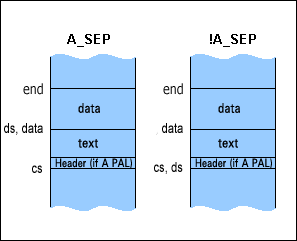
| ||
|
 | 7050 }process[PROCESS_MAX ]; | |
| 7051
int n_procs; /* Number of processes. */
| |
| | |
| If the kernel, the memory manager (mm), the file system (fs), the network server (inet), and init are in the OS image file and all these processes are loaded into memory, n_procs will be equal to 5. n_procs is set in exec_image() (see line 7515). | ||
|
| 7054
#define MAGIC_OFF 0 /* Offset of magic # in data seg.*/
| |
| | |
|
The magic number (KERNEL_D_MAGIC = 0x526F) is at the beginning
(MAGIC_OFF = 0) of the kernel data segment (see line 06478 in
the book).
Note that MAGIC_OFF and P_SIZ_OFF (see line 7060) are both offsets into the kernel data segment and are both equal to 0. The text and data sizes (see comments for line 7040) are patched into the kernel data segment at offset P_SIZ_OFF (see line 7075). exec_image() (line 7348) first checks the magic number (see line 7521) and then patches over the magic number with the sizes (see line 7528). | ||
|
| 7055
#define CLICK_OFF 2 /* Offset in kernel text to click_shift.*/
| |
| 7056
#define FLAGS_OFF 4 /* Offset in kernel text to flags.*/
| |
| | |
|
The kernel often uses "clicks" instead of bytes to describe the sizes
of different memory objects. The click shift for the kernel is found
at an offset of CLICK_OFF in the kernel code (i.e. text) segment
(see line 06053 in the book) and is equal to 8. A size in bytes is
shifted 8 bits to the right to get the click size. For example, 0x0300
bytes is equal to 0x03 clicks.
The kernel and the boot monitor save space by converting byte sizes to click sizes. The text and data click sizes for the kernel, memory manager (mm), file system (fs), and init (plus any other server that is part of the OS image) are patched into the beginning of the kernel data (see line 7182). 2 bytes are used for each click size; if byte sizes were instead used, 2 bytes would not be enough. The kernel flags are found at an offset of FLAGS_OFF in the kernel code segment (see line 06055 in the book). These flags are described in the comments for lines 7028-7035. | ||
|
|
7057 #define KERNEL_D_MAGIC 0x526F /*Kernel magic number. */
7058 7059 /*Offsetsof sizes to be patched into kernel and fs. */ | |
| 7060
#define P_SIZ_OFF 0 /* Process' sizes into kernel data.*/
| |
| | |
| Note that MAGIC_OFF and P_SIZ_OFF (see line 7060) are both offsets into the kernel data segment and are both equal to 0. The text and data sizes (see comments for line 7040) are patched into the kernel data segment at offset P_SIZ_OFF (see line 7075). exec_image() (line 7348) first checks the magic number (see line 7521) and then patches the sizes (see line 7528). | ||
|
| 7061
#define P_INIT_OFF 4 /* Init cs & sizes into fs data.*/
| |
| | |
| The text and data click sizes for init are patched into the file system (fs) data segment (see line 7191). | ||
|
| 7062 | |
| 7063 | |
| 7064
#define between(a,c,z) ((unsigned) ((c) - (a)) lt;=((z) - (a)))
| |
| | |
| between() returns TRUE if c is between a and z. | ||
|
| 7065 | |
| 7066
void pretty_image(char*image)
| |
| | |
| OS image files are typically placed in the /minix directory. | ||
|
|
7067 /* Pretty print the name of the image to load. Translate '/' and '_' to
7068 * space, first letter goes uppercase. An 'r' before a digit prints as 7069 * 'revision'. E.g. 'minix/1.6.16r10'->'Minix 1.6.16 revision 10'. 7070 * The idea is that the part before the 'r'is the official Minix release 7071 * and after the 'r' you can put versionnumbers for your own changes. 7072 */ 7073 { 7074 int up= 0, c; 7075 | |
| 7076
while ((c= *image++) != 0) {
| |
| 7077
if (c == '/' || c == '_') c= ' ';
| |
| | |
| Replace forward slashes ('/') and underscores ('_') with spaces. | ||
|
|
7078
7079 if (c == 'r' && between ('0', *image, '9')){ 7080 printf(" revision "); 7081 continue; 7082 } | |
| | |
| The first alphabetic character is capitalized. All subsequent characters are lower-case. | ||
|
| 7086 | |
| | |
| putch() prints a single character to the screen. | ||
|
|
7088 }
7089 } 7090 | |
| 7091
char * params2params(size_t*size)
| |
| | |
params2params() returns a string consisting of all the environment
variables (but no environment functions). The string will look something
like the following:
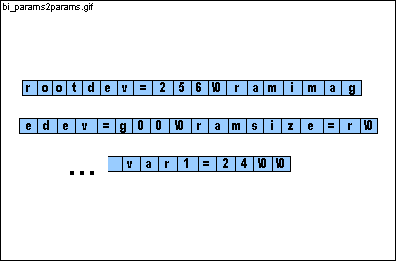
params2params() is called by exec_image() on line 7542 The string returned (params) from params2params() is used as an argument to minix() on line 7555. A reference to paramsize is passed to params2params() on line 7542; paramsize is also used as an argument to minix() on line 7555. | ||
|
|
7092 /* Repackage the environment settings for the kernel. */
7093 { 7094 char *parms; 7095 size_t i, z; | |
| 7096
environment*e;
| |
| | |
| struct environment is declared in boot.h. The flags field describes the behavior of the environment variable or function. | ||
|
| 7098 i=0; | |
| 7099 z=64; | |
| 7100
parms=malloc(z * sizeof(char *));
| |
| | |
| void *malloc(size_t size) allocates size bytes from the heap and returns a pointer to the first byte of the allocated memory. malloc() is declared in stdlib.h. (The heap is the region between the stack and the bss.) | ||
|
| 7101 | |
| | |
| We look at each environment variable and function. Only environment variables are passed to the minix kernel (see line 7107). | ||
|
|
7103 char *name= e->name, *value= e->value;
7104 size_t n; 7105 dev_t dev; 7106 | |
| | |
| Only environment variables are passed to the minix kernel. Environment functions are not passed to the minix kernel. | ||
|
| 7108 | |
| 7109 if (e->flags & E_DEV){ | |
| | |
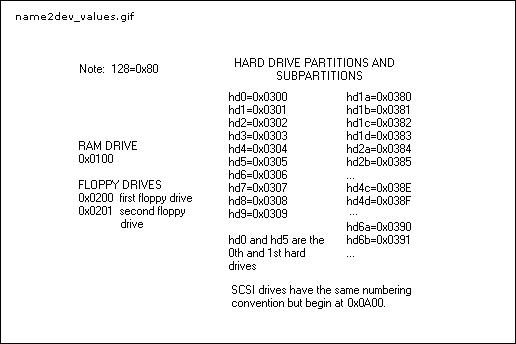
name2dev() returns the architecture-independent device number
for the device. The architecture-independent device numbers are:
 | ||
|
|
7111 free(parms);
7112 errno= 0; 7113 returnnil ; 7114 } | |
| | |
| char *ul2a10(u32_t n) (line 5746) converts n (an unsigned long) to an ascii string (base 10). | ||
|
| 7116 } | |
| 7117 | |
| 7118
n= i + strlen(name) + 1 + strlen(value) + 1;
| |
| | |
| 1 byte is allocated for the equal sign "=" (see line 7124) and 1 byte is allocated for the terminating 0. | ||
|
| 7119 if (n > z) { | |
| 7120 z+= n; | |
| 7121
parms= realloc(parms, z * sizeof(char));
| |
| | |
|
64 bytes are originally allocated for parms (see lines 7099-7100).
If 64 bytes are insufficient, the memory is reallocated for each additional
environment variable.
void *realloc(void *p, size_t size) changes the size of the memory object that is pointed to by p to size. | ||
|
|
7122 }
7123 strcpy(parms + i, name); 7124 strcat(parms + i, "="); 7125 strcat(parms + i, value); 7126 i= n; 7127 } | |
| 7128
parms[i++]=0; /* End marked with empty string. */
| |
| | |
|
2 consecutive terminating 0's mark the end of parms.
| ||
|
|
7129 *size=i;
7130 returnparms; 7131 } 7132 | |
| 7133
void raw_clear(u32_taddr,u32_t count)
| |
| | |
|
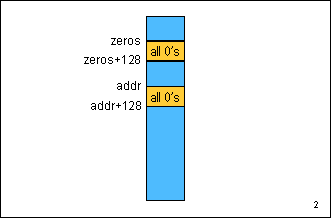
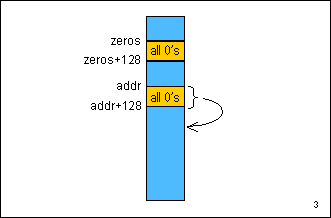
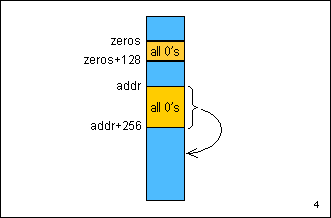
A trick is used to make this function as efficient as possible:
The first 128 zeroes are copied from the array zeros[] to the
memory address addr. The next 128 zeroes are copied from
address addr (not from zeros[]) to address addr+128.
The next 256 zeroes are copied from address addr to address addr+256.
The next 512 zeroes are copied from address addr to address addr+512.
This continues until count zeroes have been copied.
The figures below describe how 600 bytes (starting at addr) are zeroized. 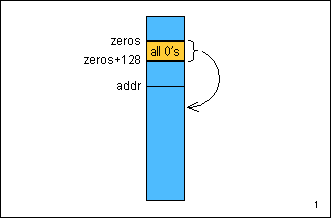
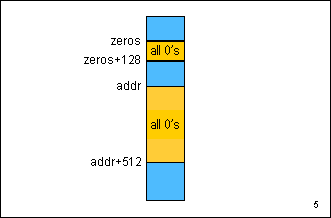
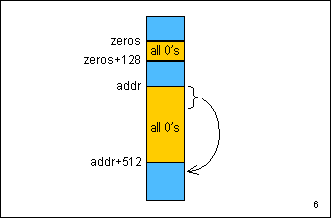
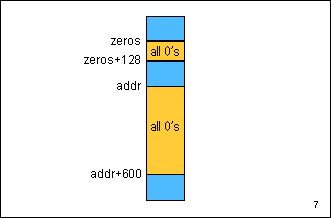
| ||
|
| 7134 /* Clear "count" bytes at absolute address"addr". */ | |
| 7135 { | |
| 7136
static char zeros[128];
| |
| | |
| Elements of an array are initialized to 0. | ||
|
|
7137 u32_t dst;
7138 u32_t zct; 7139 7140 zct= sizeof(zeros); 7141 if (zct > count) zct= count; | |
| | |
|
void raw_copy(u32_t dstaddr, u32_t srcaddr, u32_t count) copies
count
bytes from absolute memory address srcaddr to absolute memory
address dstaddr.
u32_t mon2abs(void *ptr) converts the offset memory address ptr to an absolute memory address. | ||
|
|
7143 count-= zct;
7144 7145 while (count > 0) { 7146 dst= addr + zct; 7147 if (zct > count) zct= count; | |
| | |
| void raw_copy(u32_t dstaddr, u32_t srcaddr, u32_t count) copies count bytes from absolute memory address srcaddr to absolute memory address dstaddr. | ||
|
| 7149 count-= zct; | |
| 7150
zct*= 2;
| |
| | |
| Each loop copies twice as many zeroes as the loop before. | ||
|
|
7151 }
7152 } 7153 7154 /* Align a to a multiple of n (a power of 2):*/ | |
| 7155
#define align(a,n) (((u32_t)(a) + ((u32_t)(n) - 1)) & ~((u32_t)(n)- 1))
| |
| | |
|
align(a,n) rounds a up to the next multiple of n
. n must be a multiple of 2.
align(3251, 256) = (((u32_t)(3251)+((u32_t)(256)-1)) & ~((u32_t)(256)-1)) = (((u32_t)(3251)+((u32_t)(255)) & ~((u32_t)255)) = ((u32_t)3506) & 0xFFFFFF00 = (0xFFFFFF00 is equal to ~((u32_t)255)) (0x00000DB2) & 0xFFFFFF00 = 0x00000D00 = 3328 ( 3328 is a multiple of 256 - successful! ) This is a slightly more difficult example: align(-56, 256) = (((u32_t)(-56)+((u32_t(256)-1)) & ~((u32_t)(256) - 1)) = (((u32_t)(-56)+((u32_t(255)) & ~((u32_t)255)) = ((u32_t)(0xFFFFFFC8+0x000000FF) & 0xFFFFFF00) = (0x000000C7 & 0xFFFFFF00) = 0 (-56 is rounded up to the next multiple of 256 - 0) Here's a review of the 2's complement representation of negative numbers: 56=0x00000038 Bit by bit complement: 0xFFFFFFC7 Add 1 to that: 0xFFFFFFC7 +1 ---------- 0xFFFFFFC8 (u32_t)(-56) = 0xFFFFFFC8 (in 2's complement) | ||
|
| 7156
unsigned click_shift;
| |
| 7157
unsigned click_size; /* click_size = Smallest kernel memory object. */
| |
| | |
|
The kernel often uses "clicks" instead of bytes to describe the size
of memory objects. The click shift for the kernel is found at the
beginning of the kernel code (i.e. text) segment (see line 06053 in the
book) and is equal to 8. A size in bytes is shifted 8 bits to the
right to get the size in clicks. For example, 0x0300 bytes is equal
to 0x03 clicks.
The kernel and the boot monitor save space by converting sizes in bytes to sizes in clicks. The text and data sizes in clicks for the kernel, memory manager (mm), file system (fs), and init (plus any other server that is part of the OS image) are patched into the beginning of the kernel data (see line 7182). 2 bytes are used for each size in clicks; if byte sizes were instead used, 2 bytes would not be enough. The relationship between click_size and click_shift is: click_size= 1 << click_shift (see line 7313) Since click_shift for the minix kernel is 8: click_size= 1 << click_shift = 1 << 8 = 256 | ||
|
| 7158
unsigned k_flags; /* Not all kernels are created equal. */
| |
| | |
| The kernel flags are found at an offset of FLAGS_OFF in the kernel code segment (see line 06055 in the book). These flags are described in the comments for lines 7028-7035. k_flags is set in get_clickshift() (see line 7305). | ||
|
| 7159 | |
| 7160
void patch_sizes(void)
| |
| 7161
/* Patch sizes of each process into kernel data space, kernel ds into kernel
| |
| 7162
* text space, and sizes of init into data space of fs. All the patched
| |
| 7163
* numbers are based on the kernel click size, not hardware segments.
| |
| 7164
*/
| |
| | |
|
The kernel often uses "clicks" instead of bytes to describe the size
of memory objects. The click shift for the kernel is found at the
beginning of the kernel code (i.e. text) segment (see line 06053 in the
book) and is equal to 8. A size in bytes is shifted 8 bits to the
right to get the size in clicks. For example, 0x0300 bytes is equal
to 0x03 clicks.
The kernel and the boot monitor save space by converting sizes in bytes to sizes in clicks. The text and data sizes in clicks for the kernel, memory manager (mm), file system (fs), and init (plus any other server that is part of the OS image) are patched into the beginning of the kernel data (see line 06471-06483 in the book and see line 7182 below). 2 bytes are used for each size in clicks; if byte sizes were instead used, 2 bytes would not be enough. | ||
|
|
7165 {
7166 u16_t text_size, data_size; 7167 int i; 7168 struct process *procp, *initp; 7169 u32_t doff; 7170 | |
| | |
| If K_HDR is set, the sizes don't need to be patched into the kernel and file system. | ||
|
|
7172
7173 /* Patch text and data sizes of the processes into kernel data space. 7174 */ | |
| | |
| The sizes are patched into the beginning of the kernel data (P_SIZ_OFF = 0). | ||
|
| 7176 | |
| 7177 for (i= 0; i < n_procs ; i++) { | |
| 7178 procp= &process [i]; | |
| 7179
text_size= (procp->ds - procp->cs) >> click_shift;
| |
| 7180
data_size= (procp->end - procp->ds) >> click_shift;
| |
| | |
|
cs is the absolute address of the beginning of the code segment,
ds
is the absolute address of the beginning of the data segment, and end
is the absolute address of the end of the process.
The sizes are in clicks rather than bytes (i.e. the byte sizes are shifted to the right by click_shift (=8) bits). | ||
|
| 7181 | |
| 7182 /* Two words per process, the text and data size: */ | |
| | |
| void put_word(u32_t addr, u16_t word) puts the 2-byte word at absolute address addr. | ||
|
|
7185
7186 initp= procp; /* The last process must be init. */ 7187 } 7188 | |
| | |
| Since the kernel in the book (see line 06055 in the book) loads high, the file system doesn't leave any space to patch in sizes. | ||
|
|
7190
7191 /* Patch cs and sizes of init into fs data. */ 7192 put_word (process [FS ].data + P_INIT_OFF +0, initp->cs >> click_shift ); 7193 put_word (process [FS ].data + P_INIT_OFF +2, text_size); 7194 put_word(process [FS ].data + P_INIT_OFF +4, data_size); 7195 } 7196 | |
| 7197
int selected(char *name)
| |
| | |
|
selected() returns FALSE (0) if name, a process in
the OS image, should not be loaded into memory.
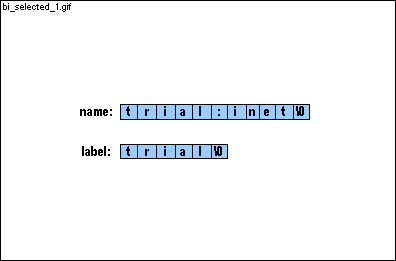
The kernel, memory manager (mm), file system (fs), network manager (inet), and init are compiled independently (which is one of the advantages of the micro kernel design). installboot (using the -i option) "glues" the kernel, mm, fs, inet and init into an OS image. Let's say you have 2 different versions of inet, a stable version and an experimental version, in an OS image. You can choose at boot time which version is to be loaded; if you named the stable version stable:inet and the experimental version test:inet and you wish to test out the experimental network manager: hd2a>label test hd2a>boot The experimental version of the network manager is loaded into memory with the kernel and the other servers; the stable version is not loaded. | ||
|
|
7198 /* True iff name has no label or the proper label. */
7199 { | |
| 7200 char *colon, *label; | |
|
7201 int cmp;
7202 | |
| | |
|
char *strchr(char *cs, char c) returns a pointer to the
first occurrence of c in cs or nil (0) if not
present. strchr() is declared in string.h.
If name does not contain a colon (:), it is loaded into memory. | ||
|
| | |
| If label is not defined, all processes in an OS image are loaded into memory. | ||
|
| 7205 | |
| 7206
*colon= 0;
| |
| | |
| ||
|
| 7207
cmp= strcmp(label, name);
| |
| | |
int strcmp(char *s1, char *s2) compares string s1
to string s2 and returns 0 if the two strings are the same.
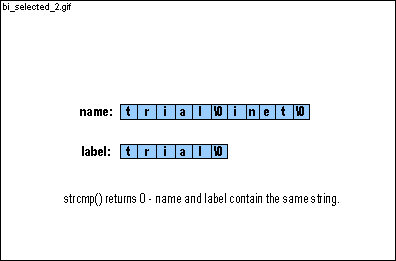
| ||
|
| 7208
*colon= ':';
| |
| | |
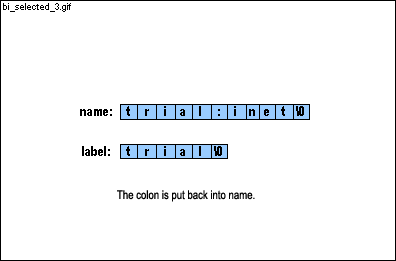
| ||
|
|
7209 return cmp == 0;
7210 } 7211 | |
| 7212
u32_t proc_size(struct image_header *hdr)
| |
| | |
|
struct image_header is declared in image.h.
struct
exec is declared in a.out.h (see line 01400 in the book).
The A_PAL (Page ALigned) flag indicates that the header appears twice, alone in the process's first sector and in the second sector directly before the text (see the figure for A_PAL, !A_SEP and the figure for A_PAL, A_SEP). The A_SEP (SEParate) flag indicates that the data segment begins on a sector boundary (see figure 3 below). 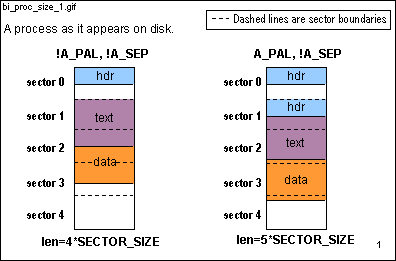 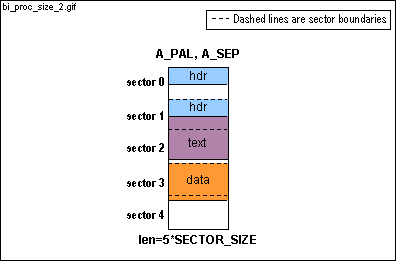
align(a,n) (line 7155) rounds a up to the next multiple of n. n must be a multiple of 2. SECTOR_SIZE=512 (a sector is 512 bytes) and SECTOR_SHIFT =9. (1=SECTOR_SIZE>>SECTOR_SHIFT) | ||
|
|
7213 /* Return the size of a process in sectors as found in an image. */
7214 { 7215 u32_t len= hdr->process.a_text; 7216 7217 if (hdr->process.a_flags & A_PAL) len+= hdr->process.a_hdrlen; 7218 if (hdr->process.a_flags & A_SEP) len= align (len, SECTOR_SIZE); 7219 len= align (len + hdr->process.a_data, SECTOR_SIZE); 7220 7221 return len >> SECTOR_SHIFT; 7222 } 7223 | |
| 7224
off_t image_off, image_size;
| |
| | |
|
If a minix file system is not present on the booted partition, image
must be a "number:number" pair. For example,
hd2a>image = 100:25 specifies that the OS image we wish to load begins at a sector offset of 100 (image_off) within the booted partition and that the image's size is 25 sectors (image_size). image_off and image_size are set in select_image() (see lines 7608-7609) and used in flat_vir2sec() (line 7239). | ||
|
| 7225
u32_t (*vir2sec)(u32_t vsec); /* Where is a sector on disk? */
| |
| | |
| vir2sec is a pointer to a function and is set to file_vir2sec (line 7227) if the booted partition has a minix file system (see line 7639) or flat_vir2sec (line 7239) if the booted partition does not have a minix file system (see line 7607). A virtual sector number is a sector offset within an OS image file. | ||
|
| 7226 | |
| 7227
u32_t file_vir2sec(u32_t vsec)
| |
| | |
|
file_vir2sec() is used if the booted partition has a minix
file system and flat_vir2sec() (line 7239) is used if the booted
partition does not have a minix file system.
If vsec is a hole (a gap in the file), file_vir2sec() returns 0. A virtual sector number is a sector offset within an OS image file. | ||
|
|
7228 /* Translate a virtual sector number to an absolute disk sector. */
7229 { 7230 off_t blk; 7231 | |
| | |
|
The old and new minix file systems work with blocks rather than sectors.
The default block size for minix is 2 sectors (1 sector = 512 bytes; 1
block = 1K bytes). For a discussion on block sizes, read section
5.3.3 in
Operating
Systems .
r_vir2abs(vsec) translates the virtual sector number vsec of the file curfil (which will be an OS image file) to an absolute disk block number and returns 0 for a hole (a gap in the file) and -1 if the block is beyond the end of the file. r_stat() (see lines 7620 and 7637) sets curfil before file_vir2sec() is called. Note that consecutive blocks within a file are not necessarily on consecutive physical blocks on the disk. One of the primary responsibilities of a file system is keeping track of where all the blocks for a file are (read section 5.6.4 in Operating Systems ). RATIO (=2) is the number of sectors per block. | ||
|
|
7233 errno= EIO;
7234 return -1; 7235 } | |
| | |
|
r_vir2abs() returns a block number; the block number is here
translated to a sector number.
If vsec is a hole (a gap in the file), file_vir2sec() returns 0. | ||
|
| 7237 } | |
| 7238 | |
| 7239
u32_t flat_vir2sec(u32_t vsec)
| |
| | |
|
file_vir2sec() (line 7227) is used if the booted partition
has a minix file system and flat_vir2sec() is used if the booted
partition does not have a minix file system.
If flat_vir2sec() is used, the OS image file begins at an offset of image_off within the partition and occupies size sectors (see lines 7608-7609). The OS image file on disk must be in sequential order. | ||
|
|
7240 /* Simply add an absolute sector offset to vsec. */
7241 { 7242 return lowsec + image_off+ vsec; 7243 } 7244 | |
| 7245
char * get_sector(u32_t vsec)
| |
| 7246
/* Read a sector "vsec" from the image into memory and return its address.
| |
| 7248
* the next request is usually satisfied from the track buffer.)
| |
| 7249
*/
| |
| | |
|
get_sector() is called in get_clickshift() (see line
7301),
get_segment() (see line 7327), and exec_image()
(see line 7391). Each time a disk read is necessary, get_sector()
reads sector vsec plus every successive sector on the same track
into
buf[] (see line 7287). If the next call to get_sector()
asks for a sector in buf[], a disk read is not necessary; a pointer
to the sector in memory is returned (see line 7270).
Here's a review of the relationship between sectors, tracks, and cylinders: 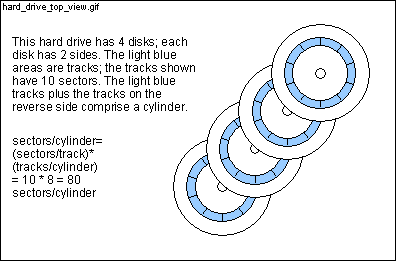 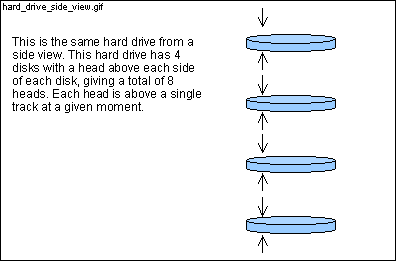
vsec is a sector offset within the file curfil (which should be an OS image file); sec (line 7251) is the corresponding absolute sector number (see line 7259). If (*vir2sec)() returns 0, vsec is a hole (in other words, vsec is a gap in the file). r_stat() (see lines 7620 and 7637) sets curfil before get_sector() is called. | ||
|
| 7250 { | |
| 7251 u32_t sec; | |
| 7252 int r; | |
| 7253
static char buf[32 * SECTOR_SIZE];
| |
| 7254
static size_t count; /* Number of sectors in the buffer. */
| |
| 7255
static u32_t bufsec; /* First Sector now in the buffer. */
| |
| | |
|
The static declaration specifies that variables (in this case,
the array buf[], count, and bufsec) remain in
existence after the function returns. Since the cache must remain
in existence from one invocation of get_sector() to the next,
the static declaration for buf[], count, and
bufsec
is necessary. Note that get_sector() returns an address
within buf[] (see lines 7270 and 7293); if buf[] didn't
stay in existence after
get_sector() returned, this returned address
would be meaningless (see lines 7327 and 7333).
The static declaration has a different meaning for external variables. The scope of an external static variable is only within the file in which the variable is declared. Note that "external" variables are variables that are declared outside of all functions. | ||
|
|
7256
7257 if (vsec == 0) count= 0; /* First sector; initialize. */ 7258 | |
| | |
| vir2sec is a pointer to a function and is set to file_vir2sec (line 7227) if the booted partition has a minix file system (see line 7639) or flat_vir2sec (line 7239) if the booted partition does not have a minix file system (see line 7607). | ||
|
| 7260 | |
| 7261
if (sec == 0) {
| |
| | |
|
If vsec is a hole (in other words, a gap in the file), set
the first SECTOR_SIZE (=512) bytes of buf[] to 0 and
return the address buf.
Note that setting count to 0 marks the cache as invalid; the next call to get_sector() will be forced to make a disk read. | ||
|
|
7262 /* A hole. */
7263 count= 0; 7264 memset(buf, 0, SECTOR_SIZE); 7265 return buf; 7266 } 7267 | |
| 7268
/* Can we return a sector from the buffer? */
| |
| | |
|
As an example, assume that the last call to get_sector() read
absolute sectors 1230 through 1245 (bufsec=1230 and count
=16). If sec is a sector within this range, a disk read
is not necessary. A disk read will not be necessary until a request
for a sector outside this range is made.
SECTOR_SIZE=512 (a sector is 512 bytes) and SECTOR_SHIFT =9. (1=SECTOR_SIZE>>SECTOR_SHIFT) | ||
|
|
7269 if ((sec - bufsec) < count) {
7270 return buf + ((size_t) (sec - bufsec) << SECTOR_SHIFT ); 7271 } 7272 7273 /* Not in the buffer. */ 7274 count= 0; | |
| 7275
bufsec= sec;
| |
| | |
| bufsec is the sector number of the first sector to be read into buf[]. | ||
|
| 7276 | |
| 7277 /* Read a whole track if possible. */ | |
| 7278
while (++count < 32 && !dev_boundary (bufsec + count)) {
| |
| | |
| int dev_boundary(u32_t sector) returns TRUE if sector is the first sector of a track. | ||
|
| 7279 vsec++; | |
| | |
| vir2sec is a pointer to a function and is set to file_vir2sec (line 7227) if the booted partition has a minix file system (see line 7639) or flat_vir2sec (line 7239) if the booted partition does not have a minix file system (see line 7607). | ||
|
|
7281
7282 /* Consecutive? */ 7283 if (sec != bufsec + count) break; 7284 } 7285 7286 /* Actually read the sectors. */ | |
| 7287
if ((r= readsectors ( mon2abs (buf), bufsec, count)) != 0) {
| |
| | |
| int readsectors(u32_t bufaddr, u32_t sector, U8_t count) reads count bytes beginning at absolute sector address sector into absolute memory address bufaddr. | ||
|
|
7288 readerr (bufsec, r);
7289 count= 0; 7290 errno= 0; 7291 return nil ; 7292 } 7293 return buf; 7294 } 7295 | |
| 7296
int get_clickshift(u32_t ksec, struct image_header *hdr)
| |
| 7297
/* Get the click shift and special flags from kernel text. */
| |
| | |
|
get_clickshift() is called by exec_image() (see line
7414).
The kernel often uses "clicks" instead of bytes to describe the size of memory objects. The click shift for the kernel is found at the beginning of the kernel code (i.e. text) segment (see line 06053 in the book) and is equal to 8. A size in bytes is shifted 8 bits to the right to get the size in clicks. For example, 0x0300 bytes is equal to 0x03 clicks. get_clickshift() gets the first sector of the kernel text (i.e. code) and reads the click shift and the kernel flags (see lines 06053-06055 in the book). | ||
|
|
7298 {
7299 char *textp; | |
| 7301
if ((textp= get_sector (ksec)) == nil) return 0;
| |
| | |
| ksec is the second sector in the kernel. The first sector contains the header and the second sector is the second sector of the code (and possibly the header again - see the comment for line 7303). | ||
|
| 7302 | |
| 7303
if (hdr->process.a_flags & A_PAL) textp+= hdr->process.a_hdrlen;
| |
| | |
|
The A_PAL (Page ALigned) flag indicates that the header is
present twice, alone in the process's first sector and in the second sector
directly before the text.
If the header is also present directly before the text, textp must skip past the header to the beginning of the code. | ||
|
| 7304
click_shift = * (u16_t *) (textp + CLICK_OFFCLICK_OFF );
| |
| | |
|
(u16_t *) (textp + CLICK_OFF) casts the value (textp +
CLICK_OFF) as a pointer to a 2 byte (16 bit) value. *(u16_t
*) (textp + CLICK_OFF) is equal to this 2-byte value (in technical
terms, this pointer is dereferenced).
CLICK_OFF (=2) and FLAGS_OFF (=4) are #define d on lines 7055-7056. | ||
|
|
7306
7307 if (click_shift < HCLICK_SHIFT || click_shift 16) { 7308 printf("%s click size is bad\n", hdr->name); 7309 errno= 0; 7310 return 0; 7311 } 7312 | |
| 7313
click_size = 1 << click_shift ;
| |
| | |
| If click_shift=8 (the default), click_size=256. | ||
|
|
7314
7315 return 1; 7316 } 7317 | |
| 7318
int get_segment(u32_t *vsec, long *size, u32_t *addr, u32_t limit)
| |
| 7319
/* Read *size bytes starting at virtual sector *vsec to memory at *addr. */
| |
| | |
|
get_segment() is called from exec_image() (see lines
7455 and 7478). get_segment() gets a text (i.e. code) or
data segment (or possibly both the text and data segments - see line 7453)
beginning at sector vsec of length size bytes from disk
and copies it to the absolute memory address addr. get_segment()
returns 1 (TRUE) if the call is successful and 0 (FALSE) if the call is
unsuccessful.
vsec is a sector offset within the file curfil (which will be an OS image file). r_stat() (see lines 7620 and 7637) sets curfil before get_segment() is called. vsec, size, and addr are pointers; the values they reference are updated (see lines 7327, 7334-7335, and 7343-7344) so that the next call to get_segment() or get_sector() is ready for the next segment or sector in the OS image file. limit is either the end of the unallocated space in lower memory (see lines 7371-7374) or the end of memory (see line 7511). | ||
|
|
7320 {
7321 char *buf; 7322 size_t cnt, n; 7323 7324 cnt= 0; | |
| 7325
while (*size > 0) {
| |
| | |
| The while loop reads sectors (512 bytes) from the disk with get_sector() (see line 7327) but copies clicks (256 bytes) with raw_copy() (see line 7333) from buf to addr. *size (the value referenced by size) can become negative; raw_copy() copies clicks instead of sectors in order to prevent *size from becoming less than -256. | ||
|
| 7326 if (cnt == 0) { | |
| 7327
if ((buf= get_sector ((*vsec)++)) == nil) return 0;
| |
| | |
| get_sector() (line 7245) returns a pointer to a buffer in memory containing the contents of vsec. vsec is a sector offset within the file curfil (which will be an OS image file). r_stat() (see lines 7620 and 7637) sets curfil before get_segment() is called. | ||
|
| 7328 cnt= SECTOR_SIZE; | |
| 7329 } | |
| 7330
if (*addr + click_size > limit) { errno= ENOMEM; return 0; }
| |
| | |
| limit is either the end of the unallocated memory in lower memory (see lines 7371-7374) or the end of memory (see line 7511). | ||
|
| 7331 n= click_size ; | |
| 7332 if (n > cnt) n= cnt; | |
| | |
|
void raw_copy(u32_t dstaddr, u32_t srcaddr, u32_t count) copies
count
bytes from absolute memory address srcaddr to absolute memory
address dstaddr.
u32_t mon2abs(void *ptr) converts the offset memory address ptr to an absolute memory address. | ||
|
|
7334 *addr+= n;
7335 *size-= n; 7336 buf+= n; 7337 cnt-= n; 7338 } 7339 | |
| 7340
/* Zero extend to a click. */
| |
| | |
| All segments should begin on click boundaries. | ||
|
| 7341
n= align (*addr, click_size ) - *addr;
| |
| | |
| align(a,n) (line 7155) rounds a up to the next multiple of n. n must be a multiple of 2. | ||
|
| | |
| void raw_clear(u32_t addr, u32_t count) (line 7133) clears count bytes beginning at absolute memory address addr. | ||
|
|
7343 *addr+= n;
7344 *size-= n; 7345 return 1; 7346 } 7347 | |
| 7348
void exec_image(char *image)
| |
| 7349
/* Get a Minix image into core, patch it up and execute. */
| |
| | |
|
exec_image() is called by bootminix() (see line 7656)
and does not return (unless something goes wrong) until the minix OS returns
to the boot monitor. The primary responsibilities of exec_image()
are:
1) load the processes from the file image into memory. The processes include the kernel, the memory manager (mm), the file system (fs), inet (if network support is enabled), and init. 2) fill in process[] (line 7044) for each process. 3) jump to the minix OS by calling minix() (see lines 7555-7556). exec_image() is one of the most important functions in the boot sequence and, unfortunately, also one of the most difficult. The difficulty is due to the process's flags and the kernel flags; the layout of the processes on disk is dependent on the process's flags and the addresses in memory where the processes are loaded is dependent on the kernel flags. The kernel flags are #defined on lines 7028-7035 and the process flags are #defined in a.out.h (see lines 01442-01446 in the book). | ||
|
| 7350 { | |
| 7351 int i; | |
| 7352
struct image_header hdr;
| |
| | |
| struct image_header is declared in image.h. Each process in the OS image begins with a header. This header, hdr, is set on line 7393. | ||
|
| 7353 char *buf; | |
| 7354
u32_t vsec, addr, limit, aout, n;
| |
| | |
|
vsec is a sector offset within the file curfil (which
should be an OS image file). r_stat()
(see lines 7620 and 7637) sets curfil before exec_image()
is called.
Processes are copied segment by segment into memory. addr is the absolute memory address where the next segment should be copied. limit is either the end of the unallocated memory in lower memory (see lines 7371-7374) or the end of memory (see line 7511). aout is the address where the process headers are placed (see lines 7373-7377). | ||
|
| | |
|
struct process is declared on line 7044.
procp is used to fill in process[] (see lines 7458, 7463-7464, and 7506). | ||
|
| 7356
long a_text, a_data, a_bss, a_stack;
| |
| | |
| The value of these variables depends on the process flags and the kernel flags. To fully understand exec_image(), one must understand the role these variables play. | ||
|
| 7357
int banner= 0;
| |
| | |
| The flag banner prevents the "banner" on lines 7425-7427 from being printed twice. | ||
|
| | |
|
The environment variable processor is set in boot.c.
b_value() returns the value of the environment variable name or nil (0) if it is a function or it doesn't exist. a2l() converts a string (like "-1023") to a long. processor will be a long of value 86, 286, 386, 486, 586, or 686. | ||
|
| 7359
char *params;
| |
| 7360
size_t paramsize;
| |
| | |
| params2params() (see line 7542) packages the environment variables into a string and returns a pointer to the string in params. paramsize is the length of this string. params and paramsize are arguments to minix() (see line 7555). | ||
|
| 7361
u16_t mode;
| |
| 7362
char *console;
| |
| | |
| mode and console are related by the expressions on lines 7545-7548; mode is used to set the video mode (see line 7549). | ||
|
| 7363 | |
| 7364 printf("\nLoading "); | |
| 7365
pretty_image (image);
| |
| | |
| pretty_image() (line 7066) "pretty prints" the name of an OS image file. For example, pretty_image() converts the OS image file name "minix/1.6.16r10" to "Minix 1.6.16 revision 10". | ||
|
|
7366 printf(".\n\n");
7367 7368 vsec= 0; /* Load this sector from image next. */ 7369 addr= mem[0].base; /* Into this memory block. */ 7370 limit= mem[0].base + mem[0].size; | |
| | |
|
The array mem[]is the memory
map (or list). mem[] is initialized in boothead.s
and is passed to the kernel as the environment
variable memory.
caddr is declared in boot.h and initialized in boothead.s. caddr is the absolute memory address of the beginning of the boot monitor. Since limit is initially the end of unallocated space in lower memory, it should not be higher in memory than caddr. | ||
|
| 7372 | |
| 7373
/* Allocate and clear the area where the headers will be placed. */
| |
| 7374
aout = (limit -= PROCESS_MAX * A_MINHDR);
| |
| 7376
/* Clear the area where the headers will be placed. */
| |
| 7377
raw_clear (aout, PROCESS_MAX * A_MINHDR);
| |
| | |
|
The headers are copied to this area on line 7422.
void raw_clear(u32_t address, u32_t count) (line 7133) clears count bytes beginning at absolute memory address address . The memory layout is as shown in the figure: 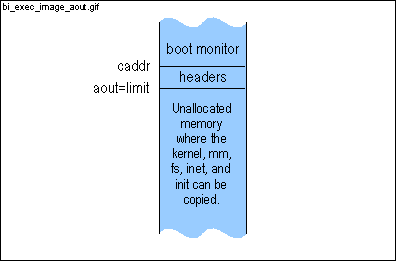
PROCESS_MAX (=16) is #defined on line 7040. A_MINHDR (=32) is #defined in a.out.h (see line 01451 in the book). Headers are either 32 bytes or 48 bytes; A_MINHDR is the size of the short header (see lines 01405-01424 in the book). | ||
|
| 7378 | |
| 7379 /* Read the many different processes: */ | |
| 7380
for (i= 0; vsec < image_size ; i++) {
| |
| | |
| This for loop (which ends on line 7513) loads the kernel, the memory manager, the file system, the network server (if network support is enabled), and init from the OS image file image into memory. This for loop loads one process at a time. It begins by copying the process's header to memory address aout (lines 7390-7422). Next, it copies the process's text and data segments (lines 7431-7478). And finally, it zeroizes the space reserved for the bss and the stack (lines 7480-7503). (Uninitialized global variables are stored in the bss.) | ||
|
| 7381
if (i == PROCESS_MAX ) {
| |
| | |
| PROCESS_MAX (=16) is #defined on line 7040. | ||
|
| 7382 printf("There are more then %d programs in %s\n", | |
| 7383 PROCESS_MAX , image); | |
| 7384
errno= 0;
| |
| | |
| If exec_image() reports the error (as is done on lines 7382-7383), errno is set to 0 to avoid further error messages (see lines 7667-7668). | ||
|
| 7385 return; | |
| 7386 } | |
| | |
| procp is used to fill in process[] (see lines 7458, 7463-7464, and 7506). | ||
|
| 7388 | |
| 7389
/* Read header. */
| |
| | |
| This for loop is used to read the current process's header. If the process isn't an executable (see line 7395) or the process does not have the correct label (see line 7398), the process is skipped (see line 7401). | ||
|
| 7390 for (;;) { | |
| 7391
if ((buf= get_sector (vsec++)) == nil) return;
| |
| | |
| get_sector() (line 7245) returns a pointer to a buffer in memory containing the contents of vsec. vsec is a sector offset within the file curfil (which should be an OS image file - in this case, curfil is image). r_stat() (see lines 7620 and 7637) sets curfil before exec_image() is called. get_sector() returns 0 (nil) if vsec is a hole (in other words, a gap in the file). | ||
|
| 7392 | |
| 7393
memcpy(&hdr, buf, sizeof(hdr));
| |
| | |
|
void *memcpy(void *s1, void * s2, size_t n) copies n
characters from s2 to s1, and returns s1.
The sizeof operator returns the size of its argument (in this case, the size of hdr). | ||
|
| 7394 | |
| 7395
if (BADMAG(hdr.process)) {
errno= ENOEXEC; return; }
| |
| | |
| BADMAG() is #defined in a.out.h (see line 01428 in the book). The first two bytes of a minix executable (see lines 01406-1407) must be the magic numbers A_MAGIC0 (0x01) and A_MAGIC1 (0x03). | ||
|
| 7396 | |
| 7397 /* Check the optional label on the process. */ | |
| | |
|
selected() (line 7197) returns FALSE (0) if hdr.name
, a process in the OS image, should not be loaded into memory.
The kernel, memory manager (mm), file system (fs), network manager (inet), and init are compiled independently (which is one of the advantages of the micro kernel design). installboot (using the -i option) "glues" the kernel, mm, fs, inet and init into an OS image. Let's say you have 2 different versions of inet, a stable version and an experimental version, in an OS image. You can choose at boot time which version is to be loaded; if you named the stable version stable:inet and the experimental version test:inet and you wish to test out the experimental network manager: hd2a>label test hd2a>boot The experimental version of the network manager is loaded into memory with the kernel and the other servers; the stable version is not loaded. | ||
|
| 7399 | |
| 7400 /* Bad label, skip this process. */ | |
| | |
| proc_size() (line 7212) returns the size (in sectors) of the process. | ||
|
| 7402 } | |
| 7403 | |
| 7404
/* Sanity check: an 8086 can't run a 386 kernel. */
| |
| | |
| A kernel compiled to run in protected mode can't run on an 8086 or an 80286. | ||
|
|
7405 if (hdr.process.a_cpu == A_I80386 && processor < 386) {
7406 printf("You can't run a 386 kernel on this 80%ld\n", 7407 processor); 7408 errno= 0; 7409 return; 7410 } 7411 7412 /* Get the click shift from the kernel text segment. */ 7413 if (i == KERNEL ) { | |
| 7414
if (!get_clickshift (vsec, &hdr)) return;
| |
| | |
| get_clickshift() gets the first sector of the kernel text (i.e. code) and reads the click shift and the kernel flags (see lines 06053-06055 in the book). | ||
|
| 7415
addr= align (addr, click_size );
| |
| | |
|
align(a,n) (line 7155) rounds a up to the next multiple
of n. n must be a multiple of 2.
The default value for click_size is 256. | ||
|
| 7416 } | |
| 7417 | |
| 7418
/* Save a copy of the header for the kernel, with a_syms
| |
| 7419
* misused as the address where the process is loaded at.
| |
| 7420
*/
| |
| 7421
hdr.process.a_syms= addr;
| |
| | |
| a_syms is normally used to hold the size of the symbol table. I believe that the symbol table is used for debugging. If someone can give a detailed description of the symbol table, please send an e-mail to feedback@swartzbaugh.net. | ||
|
| | |
|
void raw_copy(u32_t dstaddr, u32_t srcaddr, u32_t count) copies
count
bytes from absolute memory address srcaddr to absolute memory
address dstaddr.
u32_t mon2abs(void *ptr) converts the offset memory address ptr to an absolute memory address. A_MINHDR (=32) is #defined in a.out.h (see line 01451 in the book). Headers are either 32 bytes or 48 bytes; A_MINHDR is the size of the short header (see lines 01405-01424 in the book). | ||
|
| 7423 | |
| 7424
if (!banner) {
| |
| | |
| The banner is only printed once. | ||
|
| 7425 printf(" cs ds text data bss"); | |
| | |
| If the kernel flag K_CHMEM is not set, memory for the stack is not allocated to any of the processes (see lines 7435 and 7497-7503). | ||
|
| 7427 putch ('\n'); | |
| 7428 banner= 1; | |
| 7429 } | |
| 7430 | |
| 7431
/* Segment sizes. */
| |
| 7432
a_text= hdr.process.a_text;
| |
| 7433
a_data= hdr.process.a_data;
| |
| 7434
a_bss= hdr.process.a_bss;
| |
| | |
|
The header has been inspected and copied to the appropriate place;
the text (i.e. code) and data segments must now be copied from disk into
memory and (optionally) memory must be reserved for the bss and the stack.
hdr.process.a_text, hdr.process.a_data, and hdr.process.a_bss are the respective sizes (in bytes) for the text, data and the bss. The values of a_text, a_data, and a_bss, on the other hand, change to reflect the process's flags and the kernel flags. To fully understand exec_image(), one must understand the role these variables play. Have patience - lines 7431-7513 are difficult. | ||
|
| | |
| If the kernel flag K_CHMEM is not set, memory for the stack is not allocated for any of the processes (see lines 7497-7503). | ||
|
| 7436
a_stack= hdr.process.a_total - a_data - a_bss;
| |
| 7437
if (!(hdr.process.a_flags & A_SEP)) a_stack-= a_text;
| |
| | |
|
The meaning of hdr.process.a_total depends on whether the
process's
A_SEP flag is set. If the A_SEP flag
is set, hdr.process.a_total is the size (in bytes) of the data+bss+stack.
If the A_SEP flag is not set, hdr.process.a_total is
the size (in bytes) of the data+bss+stack+text. (Uninitialized global
variables are stored in the bss.)
The A_SEP (SEParate) flag indicates that the data segment begins on a sector boundary (see the A_PAL, A_SEP figure below).
| ||
|
|
7438 } else {
7439 a_stack= 0; 7440 } 7441 7442 /* Collect info about the process to be. */ 7443 procp->cs= addr; 7444 7445 /* Process may be page aligned so that the text segment contains 7446 * the header, or have an unmapped zero page against vaxisms. 7447 */ | |
| 7448 procp->entry= hdr.process.a_entry; | |
| 7449
if (hdr.process.a_flags & A_PAL) a_text+= hdr.process.a_hdrlen;
| |
| | |
|
The A_PAL (Page ALigned) flag indicates that the header appears
twice, alone in the process's first sector and in the second sector directly
before the text (see the !A_PAL, !A_SEP figure and the A_PAL, !A_SEP figure).
a_text is the number of bytes that must be read from disk for the text segment (see line 7455). If the header is in the second sector directly before the text segment, the header's length must be included in a_text. | ||
|
| 7450
if (hdr.process.a_flags & A_UZP) procp->cs-= click_size ;
| |
|
|
| |||
|
I do not understand the A_UZP flag. If anyone understands this flag and when this flag is set, please submit a comment to the site which will be displayed below. | |
|||
|
|
| |||
| 7451 | |
| 7452 /* Separate I&D: two segments. Common I&D: only one. */ | |
| 7453
if (hdr.process.a_flags & A_SEP) {
| |
| | |
|
The A_SEP (SEParate) flag indicates that the data segment begins
on a sector boundary (see the A_PAL, A_SEP figure below).
The meaning of a_data depends on whether the A_SEP flag is set. If the A_SEP flag is set, a_data is the size (in bytes) of the data segment. If the A_SEP flag is not set, a_data is the size (in bytes) of the data and text segments (plus the header if the A_PAL flag is set) combined (see line 7465). The meaning of ds depends on whether the A_SEP flag is set (see lines 7458 and 7464).
| ||
|
| 7454 /* Read the text segment. */ | |
| 7455
if (!get_segment (&vsec, &a_text, &addr, limit)) return;
| |
| | |
|
get_segment() (line 7318) gets a text segment (in this case)
beginning at sector vsec of length size bytes from disk
and copies it to the absolute memory address addr. get_segment()
returns 1 (TRUE) if the call is successful and 0 (FALSE) if the call is
unsuccessful.
vsec is a sector offset within the file curfil (which will be the OS image file image). r_stat() (see lines 7620 and 7637) sets curfil before exec_image() is called. References to vsec, size, and addr are passed to get_segment(); get_segment() updates the variables so that the next call to get_segment() (see line 7478) is ready for the next segment in the OS image file. limit is either the end of the unallocated space in lower memory (see lines 7371-7374) or the end of memory (see line 7511). | ||
|
| 7456 | |
| 7457 /* The data segment follows. */ | |
| 7458
procp->ds= addr;
| |
| | |
| addr was advanced by get_segment() (see line 7455). The next call to get_segment() (see line 7478) copies the data segment to addr. | ||
|
| 7459
if (hdr.process.a_flags & A_UZP) procp->ds-= click_size ;
| |
|
|
| |||
|
I do not understand the A_UZP flag. If anyone understands this flag and when this flag is set, please submit a comment to the site which will be displayed below. | |
|||
|
|
| |||
|
7460 procp->data= addr;
7461 } else { 7462 /* Add text to data to form one segment. */ 7463 procp->data= addr + a_text; 7464 procp->ds= procp->cs; | |
| 7465 a_data+= a_text; | |
| 7466 } | |
| 7467 | |
| 7468 printf("%06lx %06lx %7ld %7ld %7ld", | |
| 7469 procp->cs, procp->ds, | |
| 7470 hdr.process.a_text, hdr.process.a_data, | |
| 7471 hdr.process.a_bss | |
| 7472 ); | |
| 7474 | |
| 7475 printf(" %s\n", hdr.name); | |
| 7476 | |
| 7477
/* Read the data segment. */
| |
| 7478
if (!get_segment (&vsec, &a_data, &addr, limit)) return;
| |
|
|
|
|
get_segment() (line 7318) gets a data segment (or a text and
data segment if the A_SEP flag is set for the process) beginning
at sector
vsec of length size bytes from disk and copies
it to the absolute memory address addr. get_segment()
returns 1 (TRUE) if the call is successful and 0 (FALSE) if the call is
unsuccessful.
vsec is a sector offset within the file curfil (which will be the OS image file image). r_stat() (see lines 7620 and 7637) sets curfil before exec_image() is called. References to vsec, size, and addr are passed to get_segment(); get_segment() updates the variables so that the next call to get_segment() (see line 7478) is ready for the next process in the OS image file. limit is either the end of the unallocated space in lower memory (see lines 7371-7374) or the end of memory (see line 7511). | ||
|
| 7479 | |
| 7480
/* Make space for bss and stack unless... */
| |
| | |
| If the kernel flag K_CLAIM is set, space for the stack or the bss is not allocated to any process except the kernel. | ||
|
| 7482 | |
| 7483
/* Note that a_data may be negative now, but we can look at it
| |
| 7484
* as -a_data bss bytes.
| |
| 7485
*/
| |
| | |
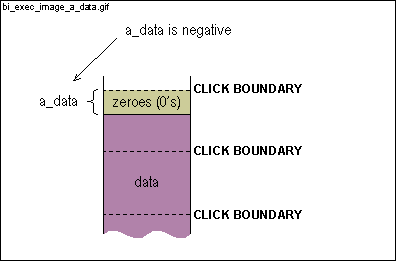
In fact, a_data is most likely negative. a_data
is 0 if the data segment ends on a click boundary.
| ||
|
| 7486 | |
| 7487
/* Compute the number of bss clicks left. */
| |
| | |
| Lines 7488-7503 make space for the bss and stack and zeroize the bss. The stack does not need to be zeroized since a value must be pushed onto the stack before it can be popped off. | ||
|
| 7488
a_bss+= a_data;
| |
| | |
a_bss is also likely to become negative (it's initially positive
- see line 7434) on this line or on line 7490.
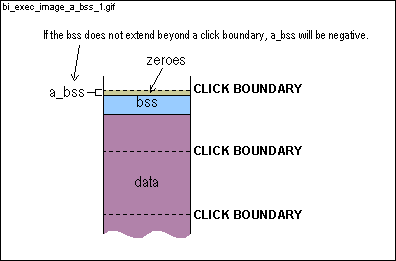
| ||
|
| 7489
n= align (a_bss, click_size );
| |
| | |
|
align(a,n) rounds a up to the next multiple of n
. n must be a multiple of 2. If a is between -255
and 0,
align(a, click_size) = align(a, 256) = 0 (see second example in comments for line 7155) | ||
|
| 7490
a_bss-= n;
| |
| | |
|
| ||
|
| 7491 | |
| 7492 /* Zero out bss. */ | |
| 7493
if (addr + n > limit) {
errno= ENOMEM; return; }
| |
| | |
| limit is either the end of the unallocated space in lower memory (see lines 7371-7374) or the end of memory (see line 7511). | ||
|
| | |
| void raw_clear(u32_t addr, u32_t count) (line 7133) clears count bytes beginning at absolute memory address addr. | ||
|
| 7495 addr+= n; | |
| 7496 | |
| 7497 /* And the number of stack clicks. */ | |
| 7498
a_stack+= a_bss;
| |
| | |
| Lines 7498-7500 are similar to lines 7488-7490. a_stack is also likely to become negative on this line or line 7500. | ||
|
| 7499 n= align (a_stack, click_size); | |
| 7500 a_stack-= n; | |
| 7501 | |
| 7502 /* Add space for the stack. */ | |
| 7503
addr+= n;
| |
| | |
| The stack ends on a click boundary. | ||
|
| 7504 | |
| 7505 /* Process endpoint. */ | |
| 7506 procp->end= addr; | |
| 7507 | |
| | |
|
If the kernel flag K_HIGH is set, all processes except for
the kernel are loaded into extended memory (extended memory is memory above
1MB).
To be consistent with lines 7413 and 7481, this should have been written (i == KERNEL ... ) rather than (i == 0 ... ). | ||
|
| 7509 /* Load the rest in extended memory. */ | |
| | |
| The array mem[] is the memory map (or list). mem[] is initialized in boothead.s and is passed to the kernel as the environment variable memory. | ||
|
|
7512 }
7513 } 7514 | |
| | |
| If the kernel, the memory manager (mm), the file system (fs), the network server (inet), and init are in the OS image file and all these processes are loaded into memory, n_procs will be 5. If n_procs is 0, there is a serious problem. | ||
|
|
7516 printf("There are no programs in %s\n", image);
7517 errno= 0; 7518 return; 7519 } 7520 7521 /* Check the kernel magic number. */ | |
| | |
|
u16_t get_word(u32_t addr) returns the 2 byte (16 bit) value
at absolute memory address addr.
The magic number (KERNEL_D_MAGIC = 0x526F) is at the beginning (MAGIC_OFF = 0) of the kernel data segment (see line 06478 in the book). If the magic number is not at this address, there is a serious problem. | ||
|
|
7523 printf("Kernel magic number is incorrect\n");
7524 errno= 0; 7525 return; 7526 } 7527 7528 /* Patch sizes, etc. into kernel data. */ | |
| 7529
patch_sizes ();
| |
| | |
| patch_sizes() (line 7160) patches various sizes into various locations. Most importantly, patch_sizes() patches the processes' sizes to the beginning of the kernel data (see lines 06471-06483 in the book). If the kernel flag K_HDR flag is set, this patching is unnecessary and the kernel instead uses the headers to determine the sizes. | ||
|
|
7530
7531 #if !DOS | |
| | |
|
If a memory map is not passed in to the kernel, the kernel may expect
the headers for the processes to be at memory address HEADERPOS.
These headers were copied to memory address aout (see line 7422).
HEADERPOS is #defined as 0x00600L in boot.h. This address is above the real mode interrupt vectors (0x0000-0x03FF) and the bios data area (0x0400-0x4FF). | ||
|
|
7533 /* Copy the a.out headers to the old place. */
7534 raw_copy ( HEADERPOS , aout, PROCESS_MAX * A_MINHDR); 7535 } 7536 #endif 7537 7538 /* Run the trailer function just before starting Minix. */ | |
| 7539
if (! run_trailer ()) { errno= 0; return; }
| |
| | |
| run_trailer() inserts trailer into the command chain and processes the commands in the command chain. trailer clears the screen. run_trailer() returns TRUE (1) if there was no error. | ||
|
| 7540 | |
| 7541 /* Translate the boot parameters to what Minix likes best. */ | |
| 7542
if ((params= params2params (¶msize)) == nil ) return;
| |
| | |
|
params2params() returns a string consisting of all the environment
variables (but no environment functions). The string will look something
like the following:
params2params returns the length of params in paramsize . params and paramsize are used as arguments to minix() (see line 7555). | ||
|
| 7543 | |
| 7544 /* Set the video to the required mode. */ | |
| | |
|
If the user sets console to a valid hexadecimal number, the
value for console is used instead of the value for chrome
as the argument to set_mode() (see line 7549).
b_value() returns the value of the environment variable name or nil (0) if it is a function or it doesn't exist. a2x() converts ascii strings in hexadecimal notation to unsigned 's. int strcmp(char *s1, char *s2) compares string s1 to string s2 and returns 0 if the two strings are the same. | ||
|
| 7546
mode= strcmp( b_value ("chrome"), "color") == 0 ? COLOR_MODE :
| |
| | |
| COLOR_MODE (=0x03) and MONO_MODE (=0x07) are #define d in boot.h. | ||
|
| 7548 } | |
| | |
| void set_mode(unsigned mode) clears the screen and sets the video mode to mode. | ||
|
| 7551 /* Close the disk. */ | |
| | |
| dev_close() does nothing under the BIOS. | ||
|
| 7553 | |
| 7554 /* Minix. */ | |
| | |
|
minix() sets up the stack the way the kernel expects it, sets
ds
and es to the kernel's ds and es, and then jumps
to the kernel. If the kernel is minix-386 (as opposed to minix-86),
minix() also switches from real mode to protected mode.
minix() returns when the OS returns to the boot monitor (for example, when the user issues the shutdown command). | ||
|
| 7557 free(params); | |
| 7558 | |
| 7559 /* Return from Minix; boot file system still around? */ | |
| | |
|
dev_open() determines the number of heads and sectors of the
device from which this code originated
and sets sectors (sectors/track) and secspcyl (sectors/cylinder) using these values. | ||
|
| | |
| r_super() returns TRUE if the file system on the device from which this code originated is a minix file system. r_super() also fills in the variable super with the parameters of the file system. | ||
|
| 7562
errno= 0;
| |
| | |
| There was either no error or the minix OS already reported the error (see lines 7667-7668). | ||
|
| 7563 } | |
| 7564 | |
| 7565
ino_t latest_version(char *version, struct stat *stp)
| |
| 7566
/* Recursively read the current directory, selecting the newest image on
| |
| 7568
*/
| |
| | |
|
The environment variable image
is either the name of an OS image file or is the name of a directory.
If
image is the name of a directory, latest_version()
returns the inode of the file in the directory image that was
last modified. (File systems use inodes to describe files and directories
- for a complete discussion of inodes, read section 5.3.1 - the I-nodes
section - and section 5.6.4 in the book.)
latest_version() is called by select_image() (line 7589) in the block that spans lines 7622-7638. This block is executed only if image is the name of a directory. latest_version() is a recursive function, which means that latest_version() calls itself (see line 7576). Recursive functions are often difficult to follow. Here's an example that shows the control flow of latest_version(). In this example, there are 3 files in the current directory and the second file was the most recently modified. 1) Determine inode number of first file in current directory. We'll call it ino1. 2) Call latest_version(). A) Determine inode number of second file (ino2). B) Call latest_version(). 1) Determine inode number of third file (ino3). 2) Call latest_version() . A) Returns immediately because there are no more files in the current directory (see line 7574). Sets stp->mtime equal to 0. 3) Fill in stat struct stp with ino3 values (see line 7578). Since ino3 is the first file to be looked at, keep its mtime value. 4) Fill in version with ino3's name and set newest to ino3 (see lines 7581-7582). 5) Return ino3 since ino3 is the most recently modified file so far (since it's the first). C) Fill in stat struct stp with ino2 values (see line 7578). Since ino2 was more recently modified than ino3, keep its mtime value. D) Fill in version with ino2's name and set newest to ino2 (see lines 7581-7582). E) Return ino2 since ino2 is the most recently modified file so far. 3) Fill in stat struct stp with ino1 values (see line 7578). Since ino2 was more recently modified than ino1, keep the current mtime value and ignore ino1's mtime value. 4) Since ino2 was more recently modified than ino1, don't fill in version with ino1's name. 5) Return ino2 since ino2 is the most recently modified file. struct stat is a subset of struct inode (see line 20510 in the book) and therefore describes a file or directory. struct stat is declared in stat.h (see line 02300 in the book). | ||
|
| 7569 { | |
| 7570
char name[NAME_MAX + 1];
| |
| | |
| ino_t r_readdir(char *name) sets name to the current entry (a file or subdirectory) in the current directory and returns the entry's inode number. Each call to r_readdir() advances to the next entry in the current directory. | ||
|
| 7571 ino_t ino, newest; | |
| 7572 time_t mtime; | |
| 7573 | |
| | |
| The st_mtime field in struct stat is the time (number of seconds since Jan. 1, 1970) of the last modification . struct stat is declared in stat.h (line 02300 in the book). A value of 0 is the least recent modification time possible - in other words, it's a long time ago. | ||
|
| 7575 | |
| 7576
newest= latest_version (version, stp);
| |
| | |
| Note that the variables version and stp are shared by all instances of latest_version(). | ||
|
| 7577
mtime= stp->st_mtime;
| |
| | |
| stp->st_mtime holds the modification time of the most recently modified file. This modification time is copied to mtime since r_stat() (see line 7578) overwrites struct stp with the information for the current file. If mtime is more recent than stp->st_mtime, the modification time of the current file, mtime is copied back to stp->st_mtime (see line 7584). | ||
|
| 7579 | |
| 7580
if (S_ISREG(stp->st_mode) && stp->st_mtime > mtime) {
| |
| | |
| S_ISREG() returns TRUE if stp describes a regular file (in other words, stp doesn't describe a directory or a special file). S_ISREG() is #defined in stat.h (see line 02354 in the book). | ||
|
| 7581 newest= ino; | |
| 7582
strcpy(version, name);
| |
| | |
| char *strcpy(char *s1, char *s2) copies string s2 to string s1, including '\0' and returns s1. | ||
|
|
7583 }else {
7584 stp->st_mtime= mtime; 7585 } 7586 return newest; 7587 } 7588 | |
| 7589
char * select_image(char *image)
| |
| 7590
/* Look image up on the filesystem, if it is a file then we're done, but
| |
| 7591
* if its a directory then we want the newest file in that directory. If
| |
| 7592
* it doesn't exist at all, then see if it is 'number:number' and get the
| |
| 7593
* image from that absolute offset off the disk.
| |
| 7594
*/
| |
| | |
|
There are three acceptable values for the environment variable image
:
1) image is the name of an OS image file. This OS image file contains the OS image that we wish to load. 2) image is the name of a directory. In this case, the most recently modified file in this directory contains the image that is loaded (see latest_version() on line 7565). 3) image is a "number:number" pair. For example, hd2a>image = 100:25 specifies that the OS image we wish to load begins at a sector offset of 100 (image_off - see line 7608) within the partition and that the image's size is 25 sectors (image_size - see line 7609). If a minix file system doesn't exist on the booted partition, this is the only option. | ||
|
| 7595 { | |
| 7596 ino_t image_ino; | |
| 7597
truct stat st;
| |
| | |
| struct stat is a subset of struct inode (see line 20510 in the book) and therefore describes a file or directory. struct stat is declared in stat.h (see line 02300 in the book). | ||
|
| 7599
image= strcpy(malloc((strlen(image) + 1 + NAME_MAX + 1)
| |
| 7600
* sizeof(char)), image);
| |
| | |
|
In case image is the name of a directory, additional space
for a file name (see lines 7622 and 7633) and a '/' (see line 7631) and
a terminating zero is allocated.
char *strcpy(char *s1, char *s2) copies string s2 to string s1, including '\0' and returns s1. size_t strlen(char *s) returns the length of the string s . strlen() is declared in <string.h>. void *malloc(size_t size) allocates size bytes from the heap and returns a pointer to the first byte of the allocated memory. malloc() is declared in stdlib.h. (The heap is the region between the stack and the bss.) NAME_MAX (=14) is #defined in limits.h (see line 00171 in the book). | ||
|
| 7601 | |
| | |
|
If a minix file system does not exist on the booted partition or the
file or directory image cannot be found in the file system, the
block spanning lines 7603-7618 is executed.
ino_t r_lookup(Ino_t cwd, char *path) returns the inode number of the file or directory path. If path is a relative path then it is relative to the directory with inode number cwd. (An absolute path begins with a '/' and a relative path does not. /minix/minix_386_09282000 is an example of an absolute path and minix/minix_386_09282000 is an example of a relative path.) ROOT_INO (=1) is the inode number of the root directory (' /'). ROOT_INO is #defined in rawfs.h. | ||
|
| 7603 char *size; | |
| 7604 | |
| | |
|
image must be a number:number pair.
numprefix() returns the address of the first nondigit from the string image in size. numprefix() returns FALSE (0) if the first character is a nondigit. numeric() returns TRUE if size is a number. | ||
|
| 7607
vir2sec = flat_vir2sec ;
| |
| | |
| vir2sec (line 7225) is a pointer set to the function flat_vir2sec() (line 7239) and is dereferenced in get_sector() (see lines7259 and 7280). | ||
|
| 7609
image_size = a2l(size);
| |
| | |
|
The boot monitor image command:
hd2a>image = 100:25 specifies that the OS image we wish to load begins at a sector offset of 100 (image_off) within the booted partition and that the image's size is 25 sectors (image_size). image_off and image_size are used in flat_vir2sec() (line 7239). | ||
|
| 7610
strcpy(image, "Minix");
| |
| | |
|
An image described by a number:number pair is given the generic name
"Minix".
char *strcpy(char *s1,char *s2) copies string s2 to string s1, including '\0' and returns s1. | ||
|
|
7611 return image;
7612 } 7613 if (!fsok ) 7614 printf("No image selected\n"); 7615 else 7616 printf("Can't load %s: %s\n", image, unix_err (errno)); | |
| 7617
goto bail_out;
| |
| | |
| One doesn't see goto's too often. The label bail_out is found on line 7642. | ||
|
| 7618 } | |
| 7619 | |
| | |
| void r_stat(ino_t file, struct stat *stp) returns information in *stp about the file whose inode number is file. | ||
|
| 7621
if (!S_ISREG(st.st_mode)) {
| |
| | |
| S_ISREG() returns TRUE if st describes a regular file (in other words, st doesn't describe a directory or a special file). S_ISREG() is #defined in stat.h (see line 02354 in the book). | ||
|
| 7622
char *version= image + strlen(image);
| |
| | |
| If the block spanning lines 7622-7638 is executed, image is a directory (unless something has gone wrong). Space was allocated on lines 7599-7600 for a '/' and a file name in case image is a directory. version points to where the '/' and the file name are inserted (see lines 7631-7633). | ||
|
| 7623
char dots[NAME_MAX + 1];
| |
| | |
| The first two entries of every directory are the entries dot ". " (the directory itself) and dot dot ".." (the parent directory). r_readdir() (see lines 7629-7630) returns the name of these two entries in dots[]. These two entries are ignored. | ||
|
| 7624 | |
| 7625
if (!S_ISDIR(st.st_mode)) {
| |
| | |
| S_ISDIR() returns TRUE if st describes a directory. S_ISDIR() is #defined in stat.h (see line 02355 in the book). | ||
|
| 7626 printf("%s: %s\n", image, unix_err (ENOTDIR)); | |
| 7627 goto bail_out; | |
| 7628 } | |
| | |
|
The first two entries of every directory are the entries dot "."
(the directory itself) and dot dot ".." (the parent directory).
r_readdir()
returns the name of these two entries in dots[] . These
two entries are ignored.
ino_t r_readdir(char *name) sets name to the current entry (a file or subdirectory) in the current directory and returns the entry's inode number. Each call to r_readdir() advances to the next entry in the current directory. | ||
|
| 7631 *version++= '/'; | |
| 7632 *version= 0; | |
| 7633
if ((image_ino= latest_version (version, &st)) == 0) {
| |
| | |
| ino_t latest_version(char *version, struct stat *stp) (line 7565) returns the inode number of the most recently modified file in the directory described by stp. latest_version() also returns the name of this file in version. latest_version() returns 0 if there are no regular files in the directory described by stp . | ||
|
| 7634 printf("There are no images in %s\n", image); | |
| 7635
goto bail_out;
| |
| | |
| One doesn't see goto's too often. The label bail_out is found on line 7642. | ||
|
| 7636 } | |
| | |
| Before this call to r_stat(), st described a directory. After this call to r_stat(), st describes the most recently modified file in this directory. Note that r_stat() sets curfil, which is used by r_vir2abs() in file_vir2sec() (see line 7232). void r_stat(ino_t file, struct stat *stp) returns information in *stp about the file whose inode number is file. | ||
|
| 7638 } | |
| | |
| vir2sec (line 7225) is a pointer set to the function file_vir2sec() (line 7227) and is dereferenced in get_sector() (see lines7259 and 7280). | ||
|
| 7640
image_size = (st.st_size + SECTOR_SIZE - 1) >> SECTOR_SHIFT ;
| |
| | |
|
image_size is the size in sectors of image. image_size
is rounded up to the next sector.
SECTOR_SIZE (=512) and SECTOR_SHIFT (=9) are #define d in boot.h. A sector is 512 bytes. The relationship between SECTOR_SIZE and SECTOR_SHIFT is: SECTOR_SIZE == 1 << SECTOR_SHIFT | ||
|
|
7641 return image;
7642 bail_out: 7643 free(image); 7644 return nil ; 7645 } | |
| 7647
void bootminix(void)
| |
| 7648
/* Load Minix and run it. (Given the size of this program it is surprising
| |
| 7649
* that it ever gets to that.)
| |
| 7650
*/
| |
| | |
| bootminix() is invoked by the boot monitor boot command and (if options are passed to the kernel) by the boot monitor boot -optsvar command. bootminix() is the high-level function that loads the OS image and calls minix(), which switches to protected mode (if the kernel was compiled for protected mode) and then jumps to the kernel. bootminix() returns when the OS returns to the boot monitor (for example, when the user issues the shutdown command). | ||
|
| 7651 { | |
| 7652 char *image; | |
| 7653 | |
| 7654
if ((image= select_image ( b_value ("image"))) == nil ) return;
| |
| | |
|
There are three acceptable values for the environment variable image:
1) image is the name of an OS image file. This OS image file contains the OS image we wish to load. 2) image is the name of a directory. In this case, the most recently modified file in this directory contains the image that is loaded (see latest_version() on line 7565). 3) image is a "number:number" pair. For example, hd2a>image = 100:25 specifies that the OS image we wish to load begins at a sector offset of 100 (image_off - see line 7608) within the partition and that the image's size is 25 sectors (image_size - see line 7609). If a minix file system doesn't exist on the booted partition, this is the only option. If a minix file system exists on the booted partition and image is not a "number:number" pair, select_image() (line 7589) sets curfil, a variable used in r_vir2abs(), to the inode number of the OS image file we wish to load. If image is a "number:number" pair, select_image() sets image_off to the first number in the "number:number" pair and sets image_size to the second number. b_value() returns the value of the environment variable image or nil (0) if it doesn't exist. | ||
|
| 7655 | |
| 7656
exec_image (image);
| |
| | |
|
exec_image() does not return (unless something goes wrong)
until the minix OS returns to the boot monitor. The primary responsibilities
of exec_image() are:
1) load the processes from the file image into memory. The processes include the kernel, the memory manager (mm), the file system (fs), inet (if network support is enabled), and init. 2) fill in process[] (line 7044) for each process. 3) jump to the minix OS by calling minix() (see lines 7555-7556). | ||
|
| 7657 | |
| 7658
switch (errno) {
| |
| | |
| errno is a global variable declared in errno.h (see line 00230 in the book). | ||
|
| 7659
case ENOEXEC:
| |
| | |
| If any of the processes in the OS image file are not executable, exec_image() (line 7348) sets errno to ENOEXEC (see line 7395). | ||
|
| 7660 printf("%s contains a bad program header\n", image); | |
| 7661 break; | |
| 7662
case ENOMEM:
| |
| | |
| If there's not enough memory, exec_image() (line 7348) sets errno to ENOMEM (see lines 7330 and 7493). | ||
|
| 7663 printf("Not enough memory to load %s\n", image); | |
| 7664 break; | |
| 7665
case EIO:
| |
| | |
| If the minix file system has trouble reading the OS image file from disk, file_vir2sec() sets errno to EIO (see line 7233). | ||
|
| 7666 printf("Unsuspected EOF on %s\n", image); | |
| 7667
case 0:
| |
| | |
| exec_image() (line 7348) reports many of the errors it discovers (see lines 7382-7384, 7406-7408, and 7523-7524). | ||
|
|
7668 /* No error or error already reported. */;
7669 } 7670 free(image); 7671 } | |
 |
end of fileback up |
 |